LakyFx VWAP EMA RSI MFI (Multi-Ex Vol)
Complete trading toolkit combining EMAs, VWAPs, PVSRA coloring, reversal markers, and multi-exchange volume aggregation.
📊 Get Indicator on TradingView→Table of Contents
Overview
What Makes This Indicator Unique?
🌐 Multi-Exchange Volume Aggregation
Unlike any other free indicator, this tool aggregates volume from 10 major crypto exchanges(Binance, OKX, MEXC, Bybit, Gate.io - both Spot and Perpetual markets). This gives you the true market picture, not just one exchange's view. For stocks/indices, it seamlessly switches to single-source mode.
🛠️ All-in-One Professional Toolkit
This single indicator combines what premium services charge $100+/month for:
- 6x EMA System - Customizable exponential moving averages with different price sources
- 4x Anchored VWAPs - Daily, Weekly, Monthly, and Quarterly VWAPs with 2 bands each
- PVSRA Candle Coloring - Volume-based candle coloring (150%/200% thresholds)
- Reversal Markers - RSI/MFI exhaustion, divergences, rejection + volume climax signals
- Liquidity Sweep Detection - EQH/EQL and swing high/low sweeps
- Multi-Exchange MFI Volume - Money Flow Index with aggregated volume
💰 100% Free Forever
No subscriptions, no hidden costs. This professional-grade indicator is completely free. What others charge hundreds of dollars monthly for, you get at $0.
⚙️ Highly Customizable
With over 100+ settings, you can fine-tune every aspect of the indicator to match your trading style. Default settings work great out of the box, but advanced traders can customize everything from EMA periods to VWAP band multipliers, reversal marker filters, and more.
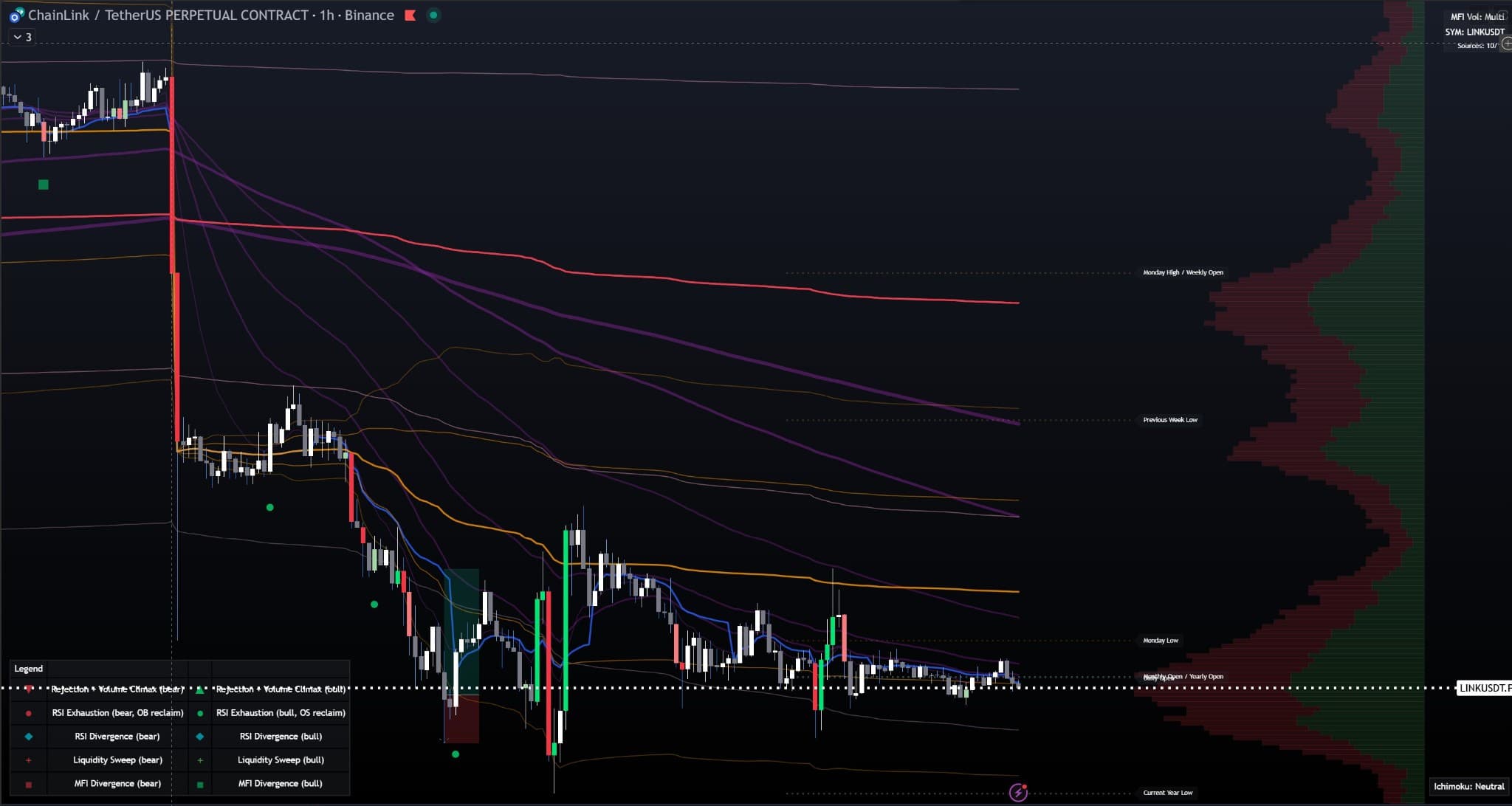
Full Chart View: All indicator components working together - 6 EMAs (purple lines), 4 VWAPs with bands (Daily/Weekly/Monthly/Quarterly), PVSRA colored candles, reversal markers (triangles, circles, diamonds, squares), volume profile (right side), and market structure lines (Monday range, weekly open, monthly open, yearly open) on LINK/USDT 1h chart.
Quick Start Guide
🚀 Get Trading in 2 Minutes
The indicator is pre-configured with optimal default settings. You can start trading immediately without any configuration!
Step 1: Add to Chart
Visit the TradingView script page and click "Use on chart" to add the indicator directly to your chart. The indicator will automatically detect your chart's base currency and map to all 10 exchanges!
📊 Get Indicator on TradingView→Step 2: Understand the Basics
- EMAs (Purple lines): Trend direction - price above = bullish, below = bearish
- VWAPs (Colored lines): Daily (blue), Weekly (orange), Monthly (aqua), Quarterly (red) - key support/resistance levels
- PVSRA Colors: Green/Red candles = high volume (150%+), White/Gray = normal volume
- Reversal Markers: Triangles = rejection + volume climax, Circles = RSI exhaustion, Diamonds = RSI divergence, Squares = MFI divergence
- Liquidity Sweeps: Cross markers show when price sweeps equal highs/lows or swing points
Step 3: Start Trading
Look for price reactions at VWAP/EMA levels combined with reversal markers. High volume (PVSRA colored) candles at these levels are especially significant.
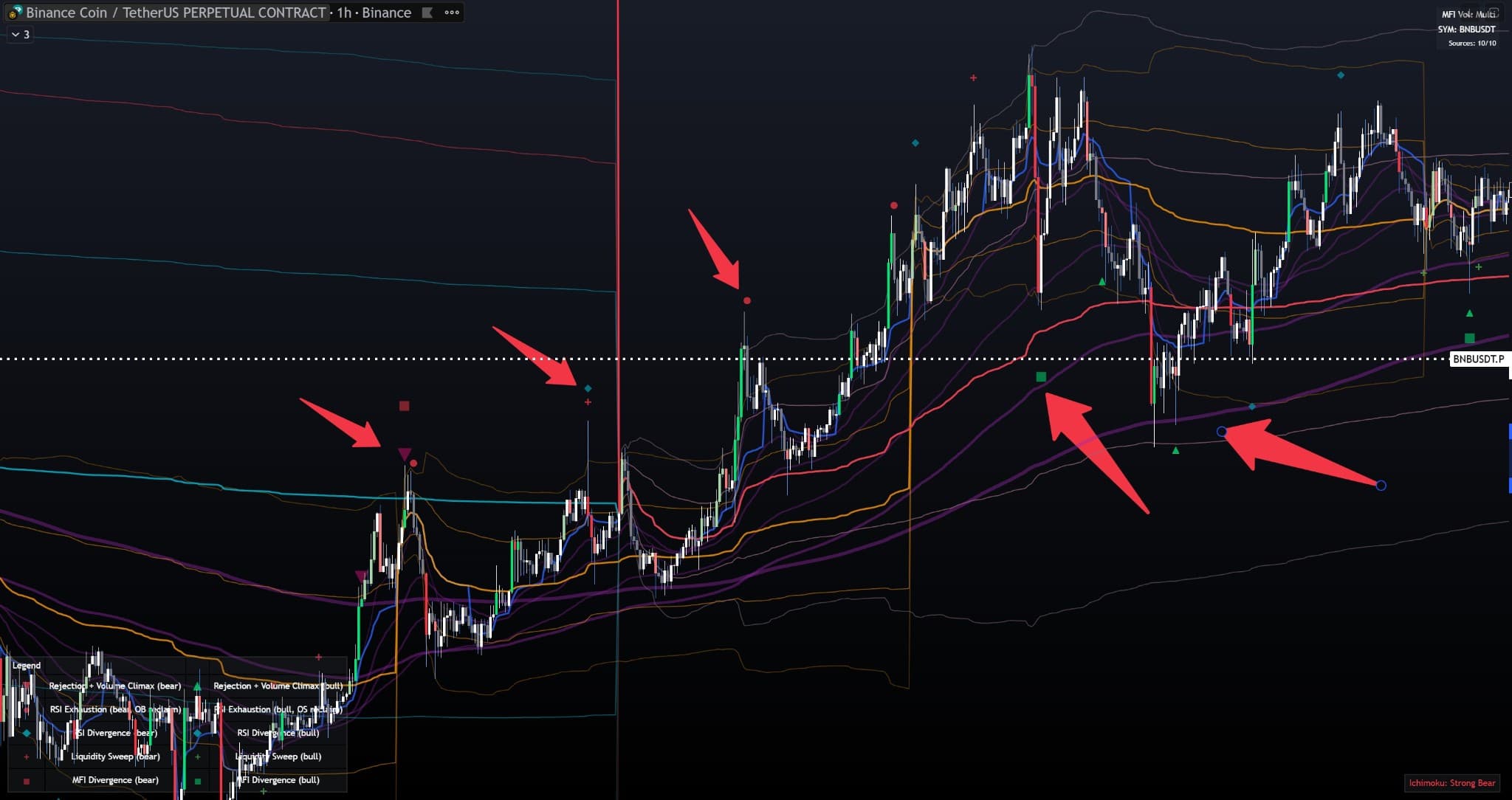
Quick Start Example: Default indicator setup on BNB/USDT 1h chart. Red arrows highlight key trading setups where multiple components (EMAs, VWAPs, reversal markers) work together. Legend in bottom left explains all signal types.
6x EMA System
The indicator includes 6 independent Exponential Moving Averages (EMAs), each fully customizable. This gives you multiple timeframe perspectives on a single chart.
EMA 1
Default: 10 periods
Fastest EMA - catches short-term momentum
EMA 2
Default: 27 periods
Short-term trend filter
EMA 3
Default: 50 periods
Medium-term trend
EMA 4
Default: 100 periods
Long-term trend (often used as support/resistance)
EMA 5
Default: 200 periods
Very long-term trend
EMA 6
Default: 400 periods
Ultra long-term trend (major support/resistance)
Customization Options
- Length: Adjust period for each EMA (1 to unlimited)
- Price Source: Choose Close, Open, High, or Low for calculation
- Show/Hide: Toggle individual EMAs on/off
- Color: All EMAs use purple by default (editable in TradingView)
- Line Width: Visual thickness (1-4px) - thicker for more important EMAs
How to Use EMAs
Trend Identification: When price is above all EMAs, the trend is strongly bullish. When below all EMAs, it's strongly bearish. Mixed positions indicate consolidation.
Support/Resistance: EMAs often act as dynamic support (in uptrends) or resistance (in downtrends). Price reactions at EMA levels are significant, especially when combined with VWAP levels.
EMA Crossovers: When faster EMAs cross above slower ones, it signals bullish momentum. Crosses below indicate bearish momentum.
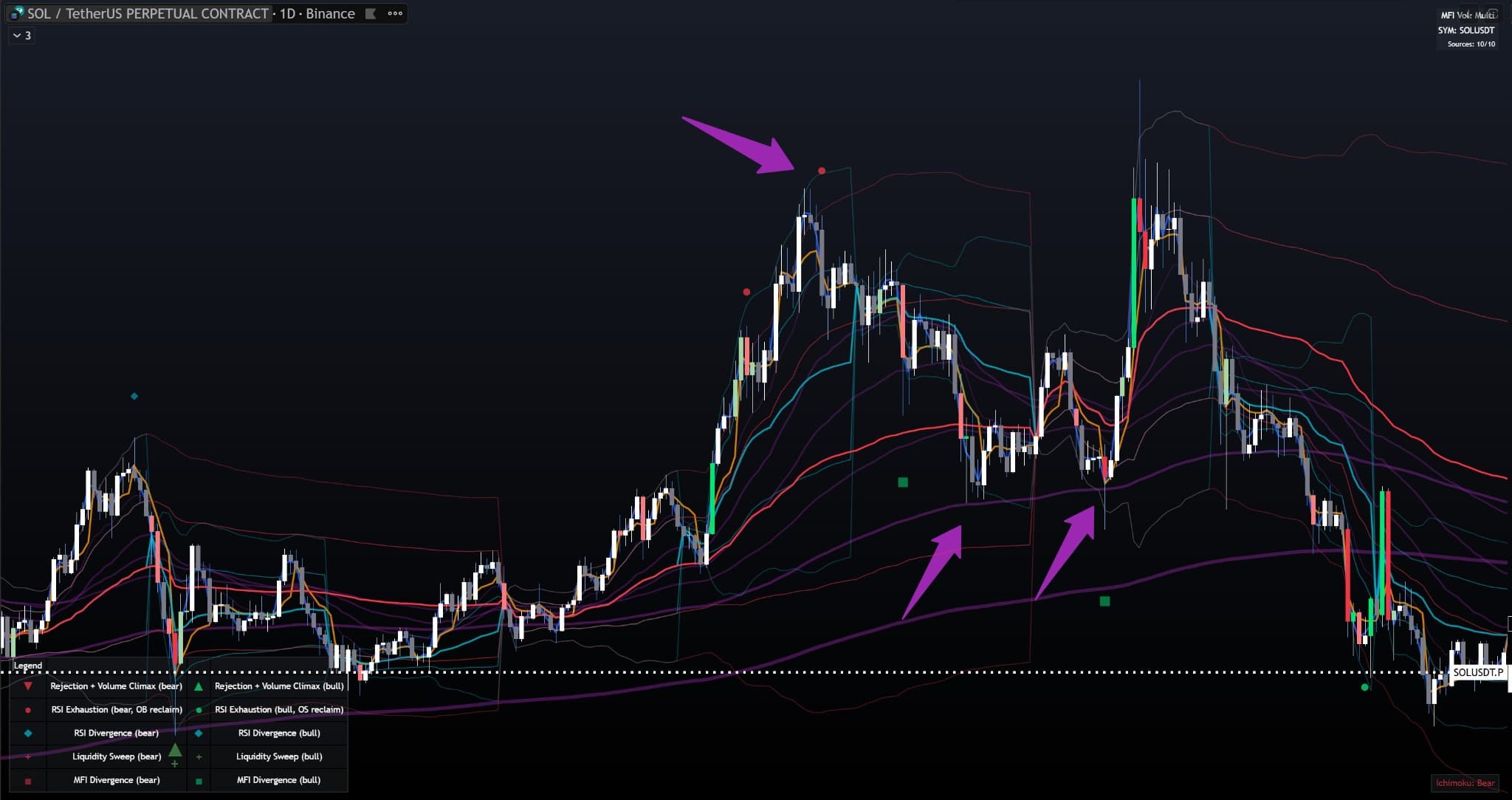
EMA Support/Resistance Example: SOL/USDT 1D chart showing all 6 EMAs. Purple arrows highlight EMA 4 (100) - the prominent purple line - acting as dynamic support during uptrend (left) and resistance after trend reversal (right). Notice how EMAs fan out upward in bullish trend and cross over in bearish trend.
4x Anchored VWAP System
The indicator includes 4 separate anchored VWAPs (Volume Weighted Average Price), each resetting at different intervals. Each VWAP has 2 bands (upper and lower) for support/resistance zones.
Daily VWAP (Blue)
Resets every day at market open. Most important for intraday trading. Price above Daily VWAP = bullish intraday bias, below = bearish.
Bands: 2 standard deviation bands (default: 1.0x and 2.0x)
Auto-display: Shown on timeframes ≤ 15 minutes
Weekly VWAP (Orange)
Resets every week. Important for swing trading and weekly bias. Acts as major support/resistance for the week.
Bands: 2 standard deviation bands
Auto-display: Shown on timeframes ≤ 1 hour
Monthly VWAP (Aqua)
Resets every month. Major institutional level. Price reactions here are very significant.
Bands: 2 standard deviation bands
Auto-display: Shown on timeframes ≤ 1 day
Quarterly VWAP (Red)
Resets every 3 months. Long-term institutional level. Major trend indicator.
Bands: 2 standard deviation bands
Auto-display: Always shown (all timeframes)
VWAP Band Calculation Modes
More accurate for volatile markets. Adapts to market volatility.
Fixed percentage bands. Simpler but less adaptive.
How to Use VWAP Bands
- Mean Reversion: Price tends to revert to VWAP after reaching bands
- Breakouts: Strong moves through bands indicate continuation
- Support/Resistance: Bands act as dynamic support (lower) and resistance (upper)
- Confluence: When multiple VWAPs align, the level is extremely significant
- Reversal Markers: Reversal signals at VWAP levels are more reliable
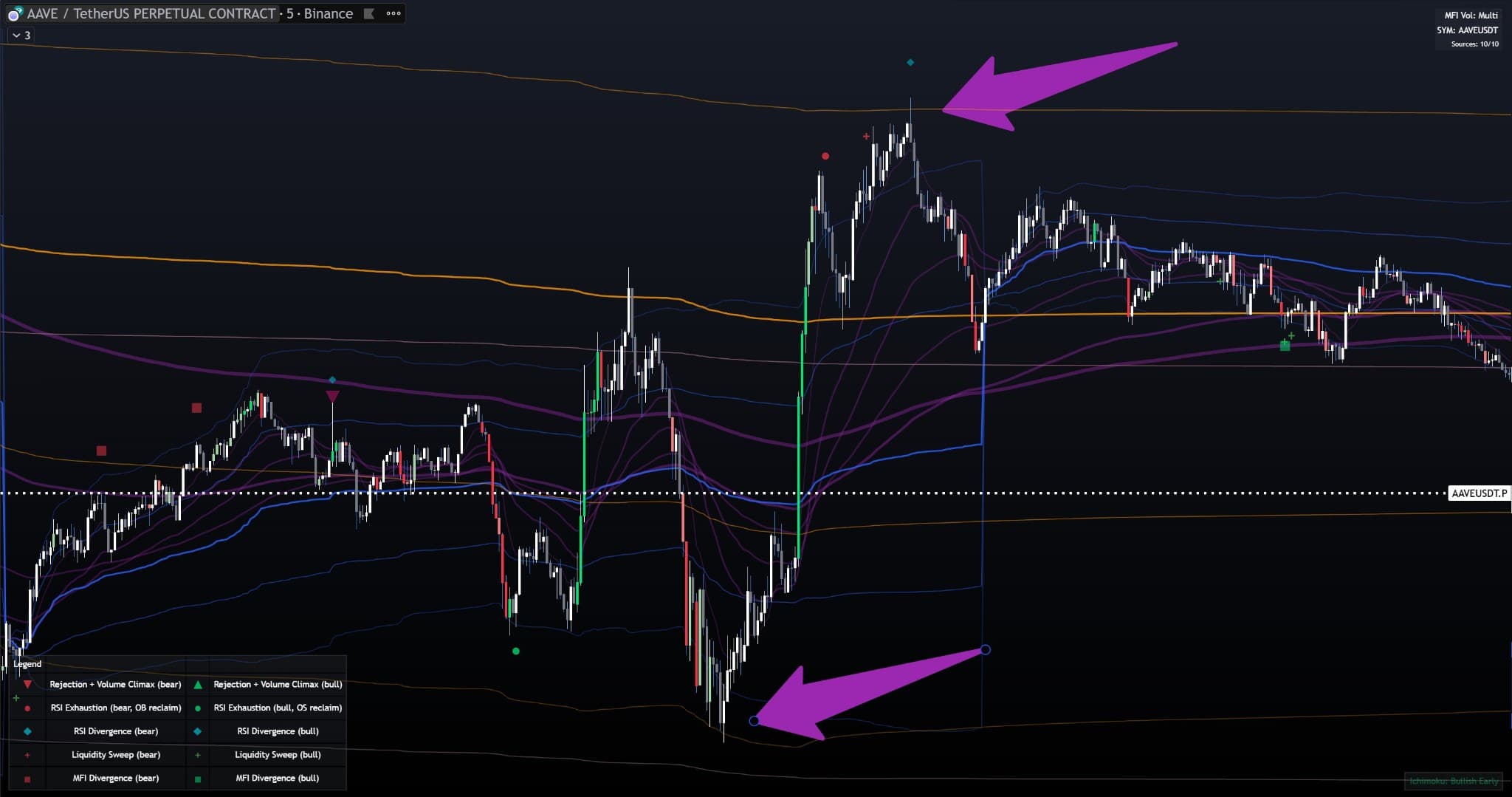
VWAP Bands Support/Resistance Example: AAVE/USDT 5m chart showing all 4 VWAPs (Daily, Weekly, Monthly, Quarterly) with their bands. Purple arrows highlight clear examples: price bouncing off lower VWAP band (support - bottom arrow) and price rejection at upper VWAP band (resistance - top arrow). Notice how bands act as dynamic support/resistance levels.
PVSRA Candle Coloring
PVSRA (Price Volume Spread Range Analysis) candle coloring highlights volume intensity. This helps you instantly identify high-volume candles (climax) which often mark significant price movements.
200% Volume (Lime/Red)
Volume is 2x or more the average. Extreme climax - very significant.
150% Volume (Light Green/Pink)
Volume is 1.5x to 2x the average. High volume - significant.
Normal Volume (White/Gray)
Volume below 1.5x average. Normal market activity.
How It Works
The indicator calculates: Volume Ratio = Current Volume / Average Volume (20 bars)
Green/Lime candles: Bullish candles (close ≥ open) with high volume
Red/Pink candles: Bearish candles (close < open) with high volume
White/Gray candles: Normal volume candles (bullish/bearish)
Multi-Exchange Volume Source
By default, PVSRA uses volume from Binance Perpetual (if available) for more accurate volume data. Falls back to chart volume if PERP symbol is not found. You can override this with a custom symbol.
Trading Applications
- Volume Climax: High volume candles often mark exhaustion or breakouts
- Reversal Markers: Combined with rejection candles, high volume increases signal reliability
- Breakout Confirmation: High volume on breakouts confirms the move
- Absorption: High volume with little price movement = absorption (smart money accumulation/distribution)
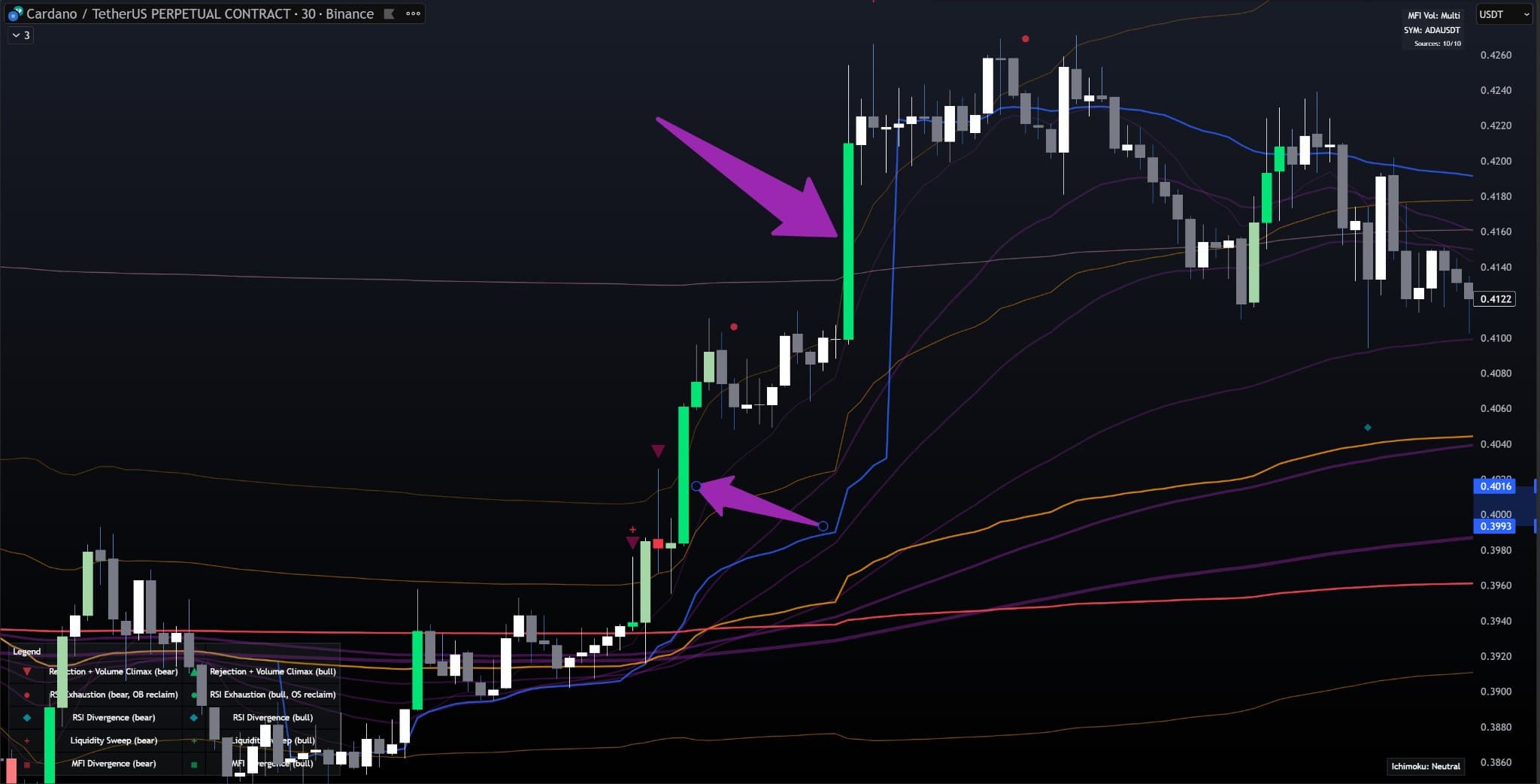
PVSRA Candle Coloring Example: ADA/USDT 30m chart showing PVSRA colored candles - bright green (200% volume), light green (150% volume), white (normal bullish), and gray (normal bearish). Purple arrows highlight high volume green candles (200%) marking strong breakouts and trend continuations. Notice how extreme volume candles often coincide with significant price movements.
Reversal Markers
The indicator includes multiple types of reversal markers that help identify potential trend reversals and continuation patterns. All markers can be filtered by VWAP/EMA levels and trend filters.
🔺 Rejection + Volume Climax (Triangles)
Combines wick rejection (long upper/lower wick) with volume climax (150% or 200% of average volume).
Bull Triangle: Long lower wick + high volume + close near high
Bear Triangle: Long upper wick + high volume + close near low
Filters: Can require reaction at VWAP/EMA level, sweep + reclaim, trend filter
⭕ RSI Exhaustion (Circles)
Signals when RSI exits overbought (OB) or oversold (OS) zones, indicating potential exhaustion.
Bull Circle: RSI crosses above 30 (exiting oversold)
Bear Circle: RSI crosses below 70 (exiting overbought)
Default: RSI(20), OB=70, OS=30
Filters: Can require VWAP/EMA level reaction, trend filter
💎 RSI Divergence (Diamonds)
Detects divergences between price and RSI - powerful reversal signals.
Bull Diamond: Price makes lower low, RSI makes higher low
Bear Diamond: Price makes higher high, RSI makes lower high
Settings: Pivot detection (left/right bars), min RSI difference, cooldown
Filters: Level reaction, trend filter
⬜ MFI Divergence (Squares)
Similar to RSI divergence but uses Money Flow Index (MFI) with multi-exchange volume.
Bull Square: Price lower low, MFI higher low
Bear Square: Price higher high, MFI lower high
Volume Source: Uses aggregated volume from 10 exchanges (when enabled)
Filters: Level reaction, trend filter
Level Filtering
All reversal markers can be filtered to only show when price reacts at VWAP or EMA levels. This significantly increases signal quality by focusing on key institutional levels.
- VWAP Levels: Daily, Weekly, Monthly, Quarterly (and their bands)
- EMA Levels: EMA 1-6 (configurable which ones to include)
- Proximity: How close price must be (in ATR) - default 0.15 ATR
- Sweep + Reclaim: Optional requirement for price to sweep past level and close back
Trend Filters
Prevents signals during choppy/neutral markets
Only shows signals when there's clear trend direction
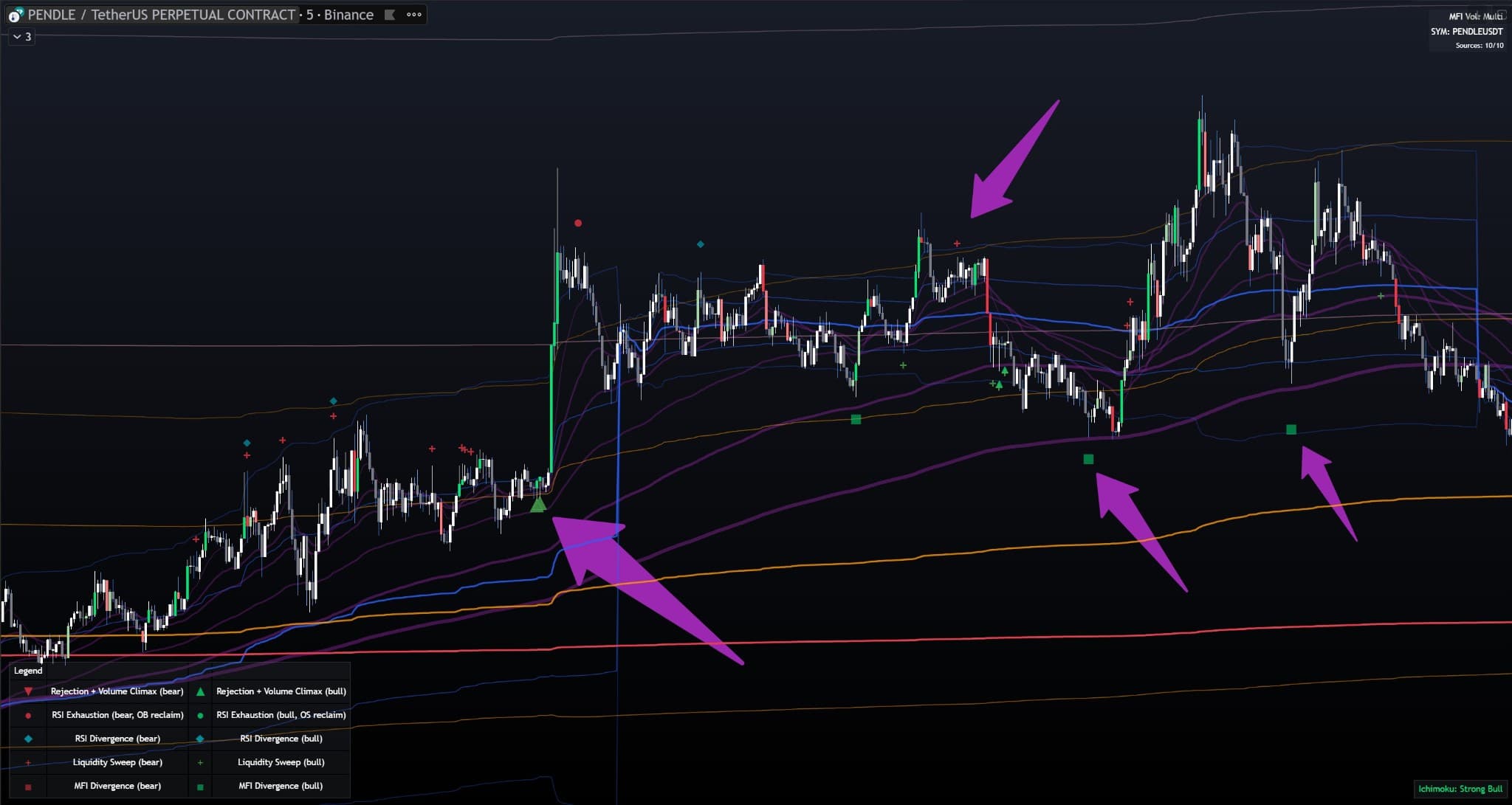
All Reversal Marker Types Example: PENDLE/USDT 5m chart showing all marker types: triangles (rejection + volume climax), circles (RSI exhaustion), diamonds (RSI divergence), and squares (MFI divergence). Purple arrows highlight successful bullish reversals where markers appear at VWAP/EMA support levels (thick purple line), demonstrating how multiple marker types can work together to identify high-probability reversal points.
Liquidity Sweep Markers
Liquidity sweeps occur when price briefly breaks through a key level (stop hunting) and then reverses. These are powerful reversal signals, especially when combined with reclaim of the level.
EQH/EQL Detection (Equal Highs/Lows)
Detects when price sweeps through equal pivot highs (EQH) or equal pivot lows (EQL).
How it works: Finds two pivots within tolerance (default: 0.8 ATR) and detects sweeps
Pivot Strength: Configurable left/right bars (default: 4 bars each)
Max Distance: Maximum bars between pivots (default: 300)
Reclaim Required: Price must close back inside the level after sweep
Swing High/Low Sweeps
Detects sweeps of recent swing highs or lows within a lookback window.
Lookback: How far back to search for swing points (default: 300 bars)
Sweep + Reclaim: Price must sweep past and close back
Wick Dominance: Sweep candle must have long wick (default: ≥60% of candle range)
Why Liquidity Sweeps Matter
- Stop Hunting: Large players often hunt stops above/below key levels before reversing
- High Probability: Sweeps followed by reclaims have high reversal probability
- Entry Points: Excellent entry points for counter-trend trades
- Risk Management: Clear stop loss levels (beyond the sweep)
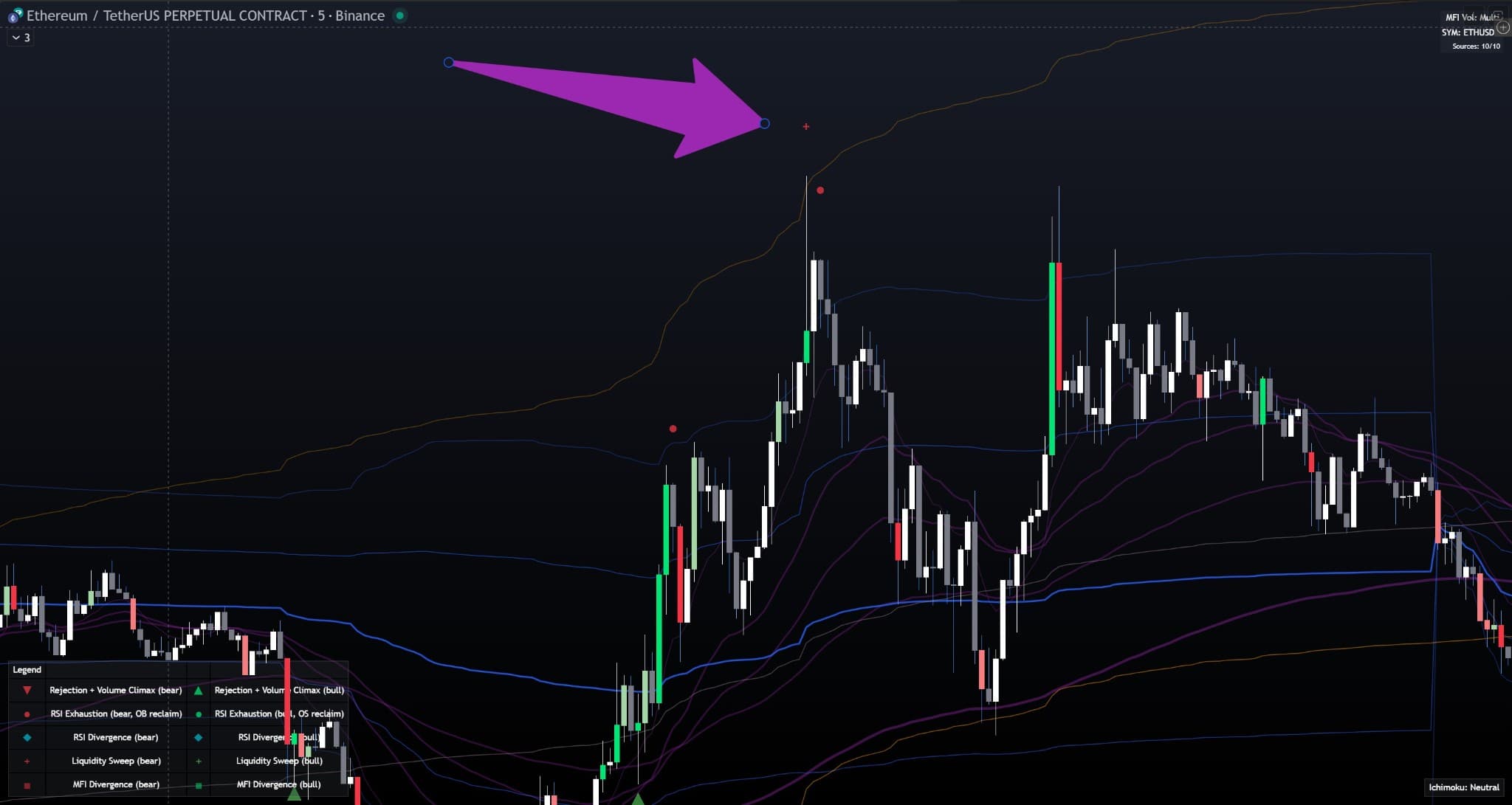
Liquidity Sweep Example: ETH/USDT 5m chart showing liquidity sweep markers (red/green crosses) at EQH/EQL levels. Purple arrow highlights a clear example: price sweeps through a level(triggering stop-losses above), then reverses and reclaims the level, initiating a strong downtrend. This demonstrates the classic "stop hunting" pattern where large players hunt liquidity before reversing.
Multi-Exchange Volume Aggregation
This is one of the most unique features of the indicator - it aggregates volume from 10 major crypto exchanges, giving you the true market picture.
Supported Exchanges
How It Works
Auto Symbol Mapping: When enabled (default), the indicator automatically maps your chart's base currency (e.g., BTC, ETH) to the correct symbol on each exchange. For example, if you're viewing BTC, it automatically uses BINANCE:BTCUSDT, OKX:BTCUSDT.P, etc.
Volume Aggregation: Sums volume from all enabled exchanges. If an exchange doesn't list the asset, it contributes 0 (no error).
Manual Override: You can disable auto-mapping and manually set symbols for each exchange.
Stocks/Indices Mode: For non-crypto assets, automatically uses single chart volume.
Where Multi-Exchange Volume Is Used
- MFI Calculation: Money Flow Index uses aggregated volume (more accurate)
- MFI Divergence: More reliable divergences with true market volume
- Volume Table: Shows active sources count (top-right corner when enabled)
Benefits
- True Market Picture: See total market volume, not just one exchange
- More Accurate: Reduces impact of single-exchange manipulation
- Better Signals: MFI and divergences are more reliable with aggregated volume
- No Setup Required: Auto-mapping works out of the box
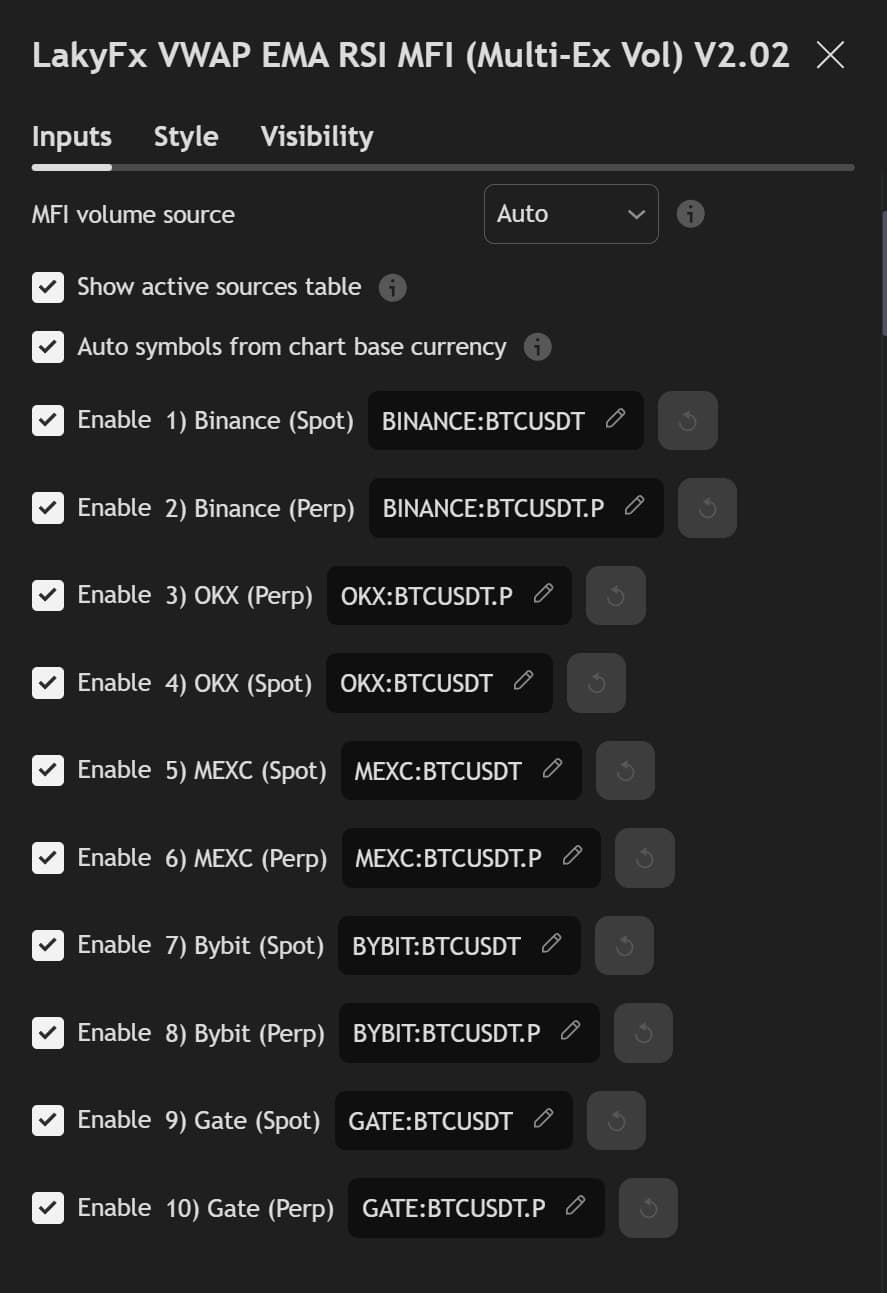
Multi-Exchange Volume Settings: Settings panel showing "MFI Volume (10 markets)" section with all 10 exchanges enabled: Binance (Spot & Perp), OKX (Spot & Perp), MEXC (Spot & Perp), Bybit (Spot & Perp), and Gate.io (Spot & Perp). Auto symbol mapping is enabled, automatically using BTCUSDT symbols for all exchanges. When enabled, the volume table in the top-right corner of the chart displays "Sources: 10/10" showing all active volume sources.
Complete Settings Guide
The indicator has 100+ settings for complete customization. This guide explains each setting group and how they affect the indicator's behavior.
PVSRA Settings
Master switch - turn OFF to disable all PVSRA coloring
Uses Binance Perpetual volume (more accurate). Falls back to chart volume if unavailable.
Manually specify volume source symbol (e.g., BINANCE:BTCUSDT.P)
SMA period for average volume (default: 20). Higher = smoother, fewer climax readings.
EMA Settings (6x)
Each EMA (1-6) has identical settings:
Higher = smoother, slower to react
Close is standard, but High/Low can be useful for specific strategies
VWAP Settings (4x: Daily, Weekly, Monthly, Quarterly)
Each VWAP has identical settings structure:
- Standard Deviation: VWAP ± (StDev × Multiplier) - adaptive to volatility
- Percentage: VWAP × (1 ± %/100) - fixed percentage
StdDev mode: multiplier. Percentage mode: percent value
Automatically shows/hides VWAP bands based on chart timeframe:
- ≤15m: Daily, Weekly, Monthly, Quarterly bands
- 16m-1h: Weekly, Monthly, Quarterly bands
- >1h-1D: Monthly, Quarterly bands
- >1D: Quarterly bands only
Turn OFF to always show all bands regardless of timeframe.
Reversal Markers Settings
Waits for bar close before showing marker - more reliable
Which volume threshold to use for climax detection
Only shows markers when price is near VWAP/EMA
Lower = stricter (must be very close)
Price must sweep past level and close back
Minimum wick size to qualify as rejection
How close close must be to candle extreme (0 = at extreme)
RSI Exhaustion Settings
RSI Divergence Settings
Higher = fewer, stronger pivots
MFI Divergence Settings
Trend Filter Settings
No signals when price is within this distance from Trend EMA
Minimum slope required for signals
Liquidity Sweep Settings
Max distance between pivots to be considered "equal"
How far back to search for swing highs/lows
MFI Volume (10 markets) Settings
Auto: Crypto = multi, Non-crypto = single
Automatically maps symbols per exchange
⚙️ Ultimate Customization - 100+ Settings
No other free indicator on TradingView offers this level of customization. Every aspect can be fine-tuned to match your trading style. Below are detailed views of all setting groups, demonstrating the comprehensive control available.
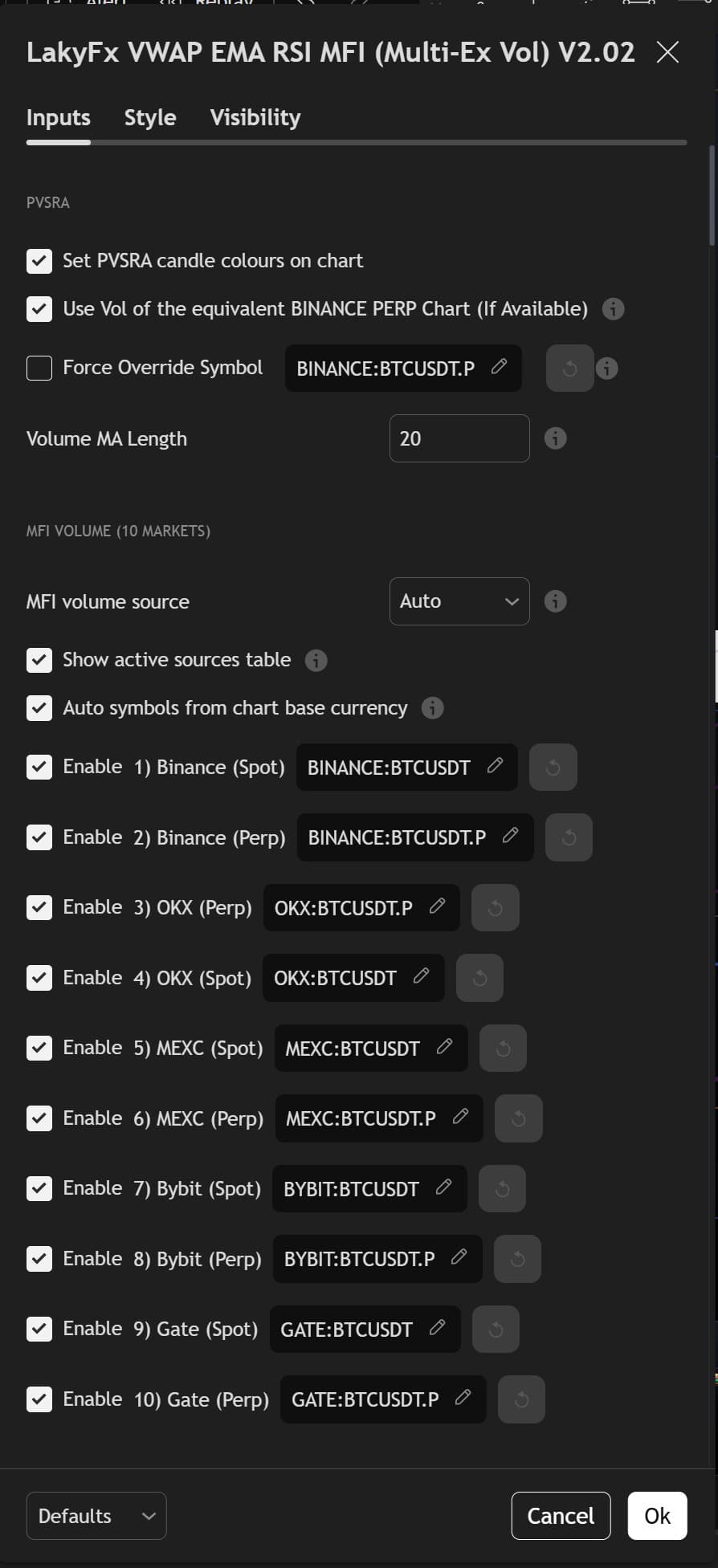
1. PVSRA & Multi-Exchange Volume
Configure PVSRA candle coloring (150%/200% thresholds) and enable all 10 exchanges for multi-exchange volume aggregation. Auto symbol mapping automatically uses correct symbols for each exchange.
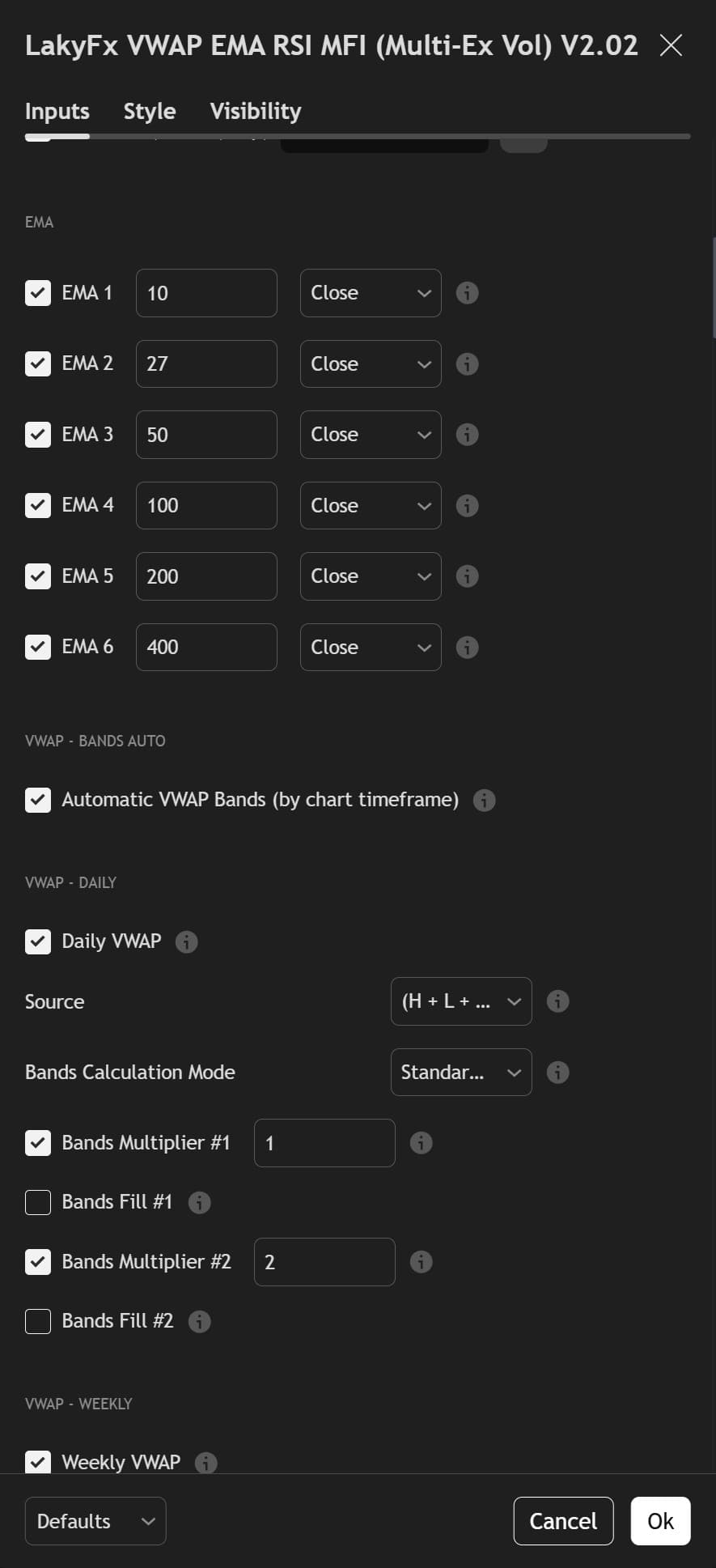
2. EMA System & VWAP Bands
Configure all 6 EMAs (periods, price source) and all 4 VWAPs (Daily, Weekly, Monthly, Quarterly) with their bands. Automatic VWAP bands adjust by timeframe for optimal display.
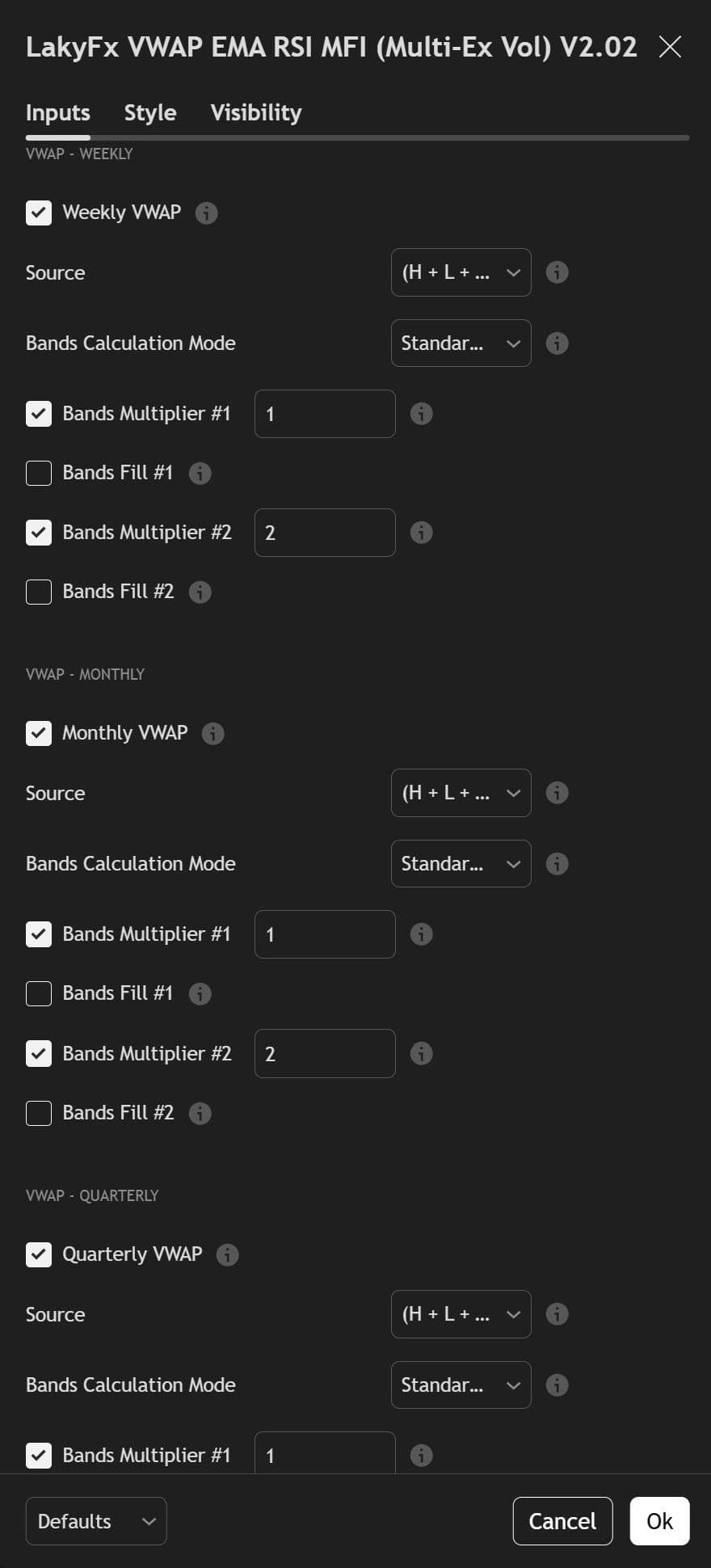
3. VWAP Weekly/Monthly/Quarterly
Detailed settings for Weekly, Monthly, and Quarterly VWAPs. Each has independent source, band calculation mode (Standard Deviation/Percentage), and two band multipliers with optional fill.
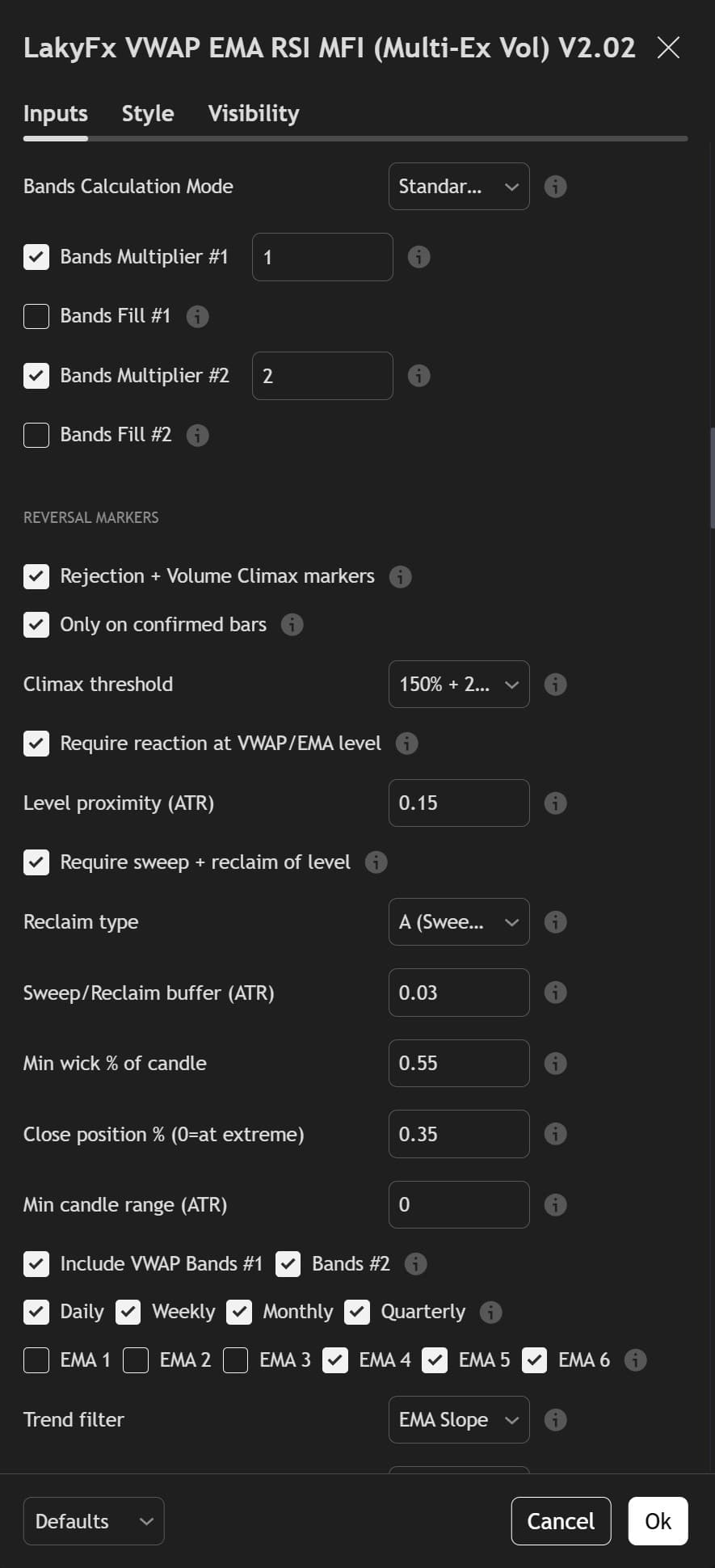
4. Reversal Markers
Comprehensive Rejection + Volume Climax marker settings. Configure climax thresholds, level proximity, sweep + reclaim requirements, wick dominance, and select which VWAP bands/EMAs to include. Trend filter options available.
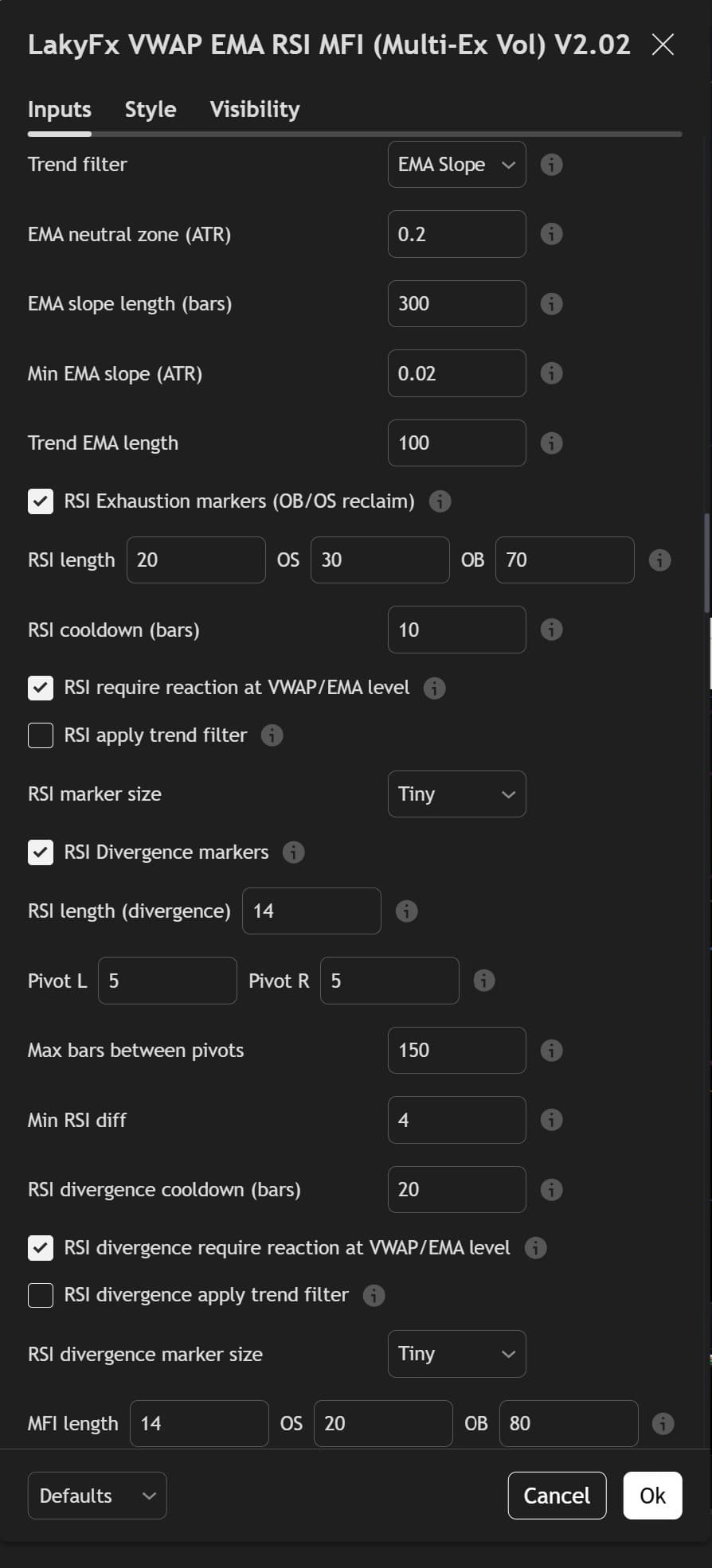
5. Trend Filter & RSI/MFI Settings
Trend filter (EMA Gate/Slope), RSI Exhaustion markers (OB/OS reclaim), RSI Divergence detection (pivot strength, cooldown), and MFI configuration. Each marker type has independent level filtering and trend filter options.
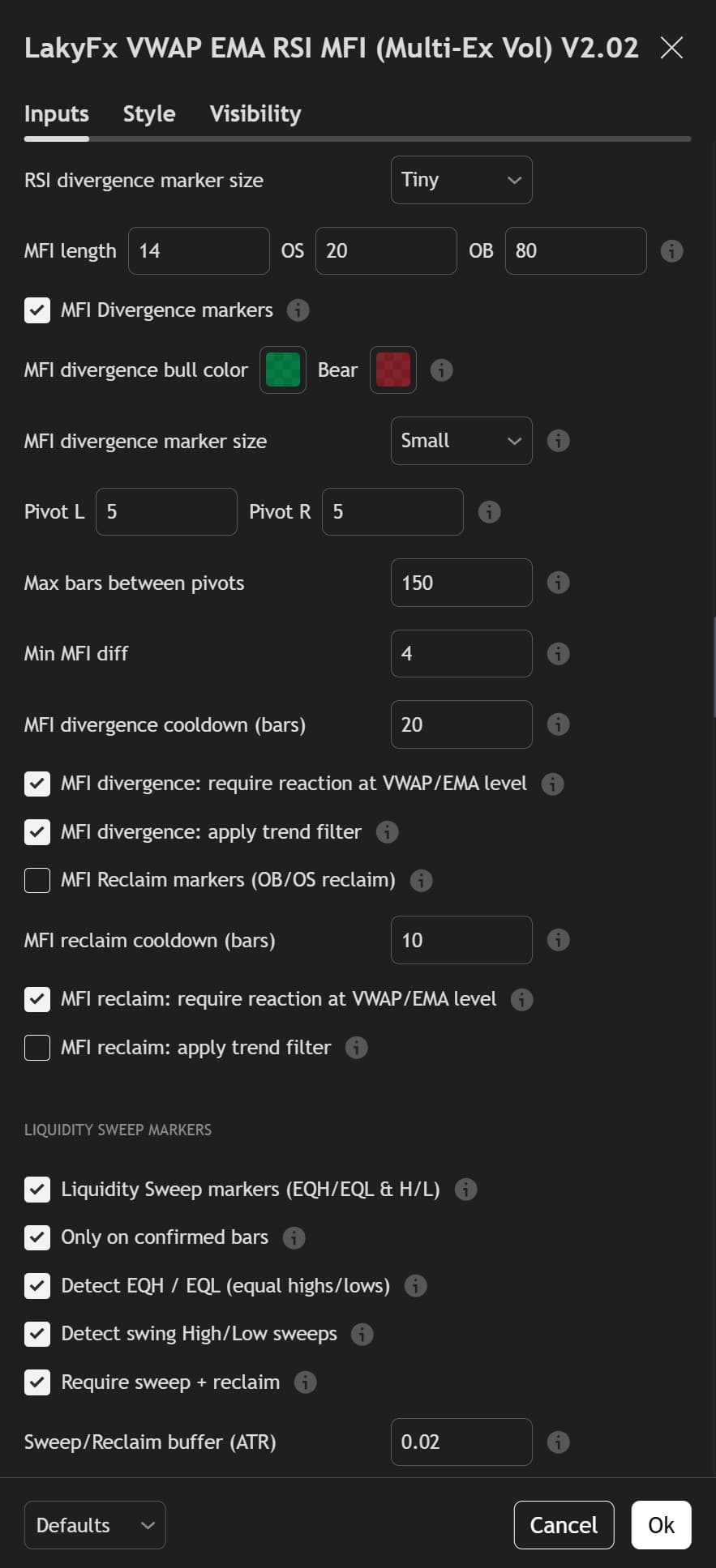
6. MFI Divergence & Liquidity Sweeps
MFI Divergence markers with pivot detection, cooldown, and level filtering. Liquidity Sweep detection for EQH/EQL (equal highs/lows) and swing high/low sweeps with sweep + reclaim requirements and wick dominance filters.
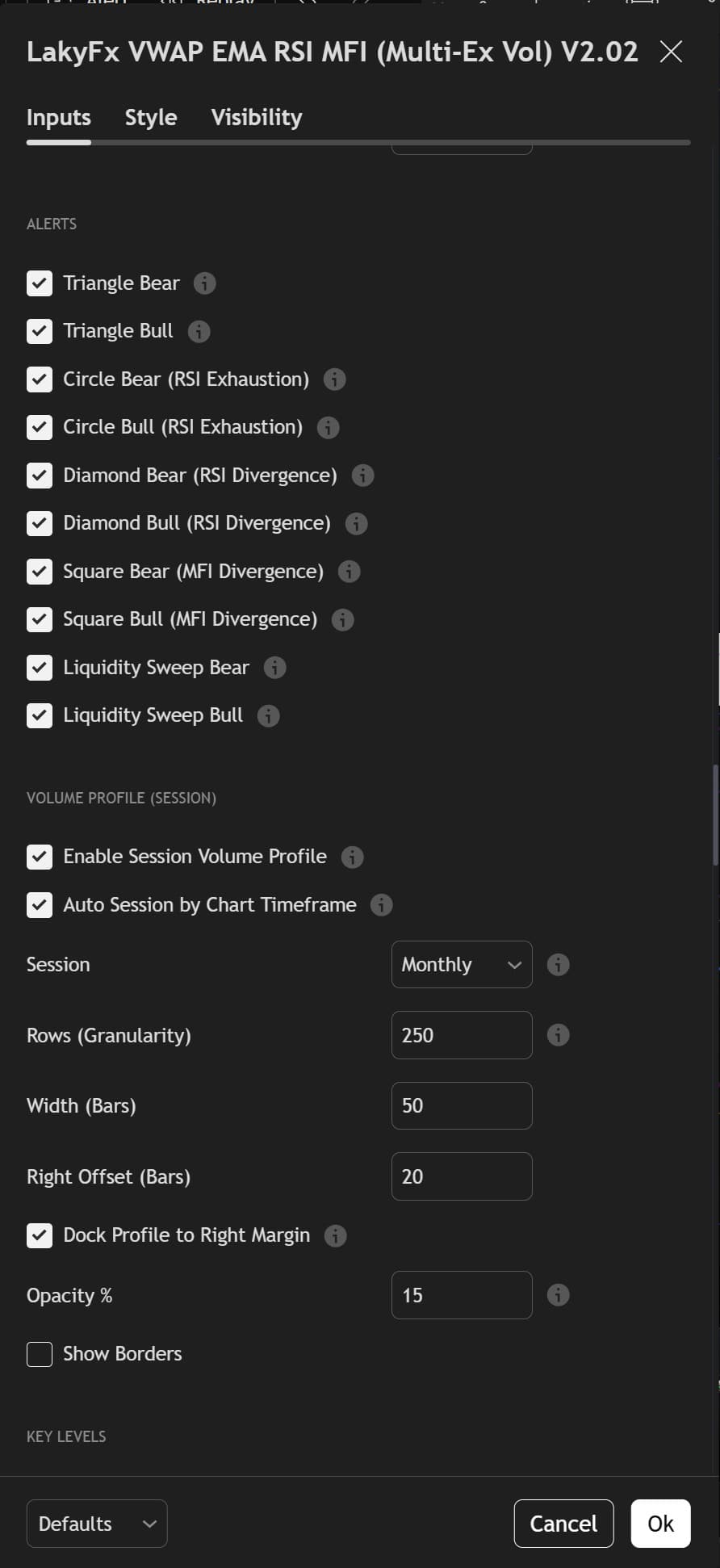
7. Alerts & Volume Profile
Enable alerts for all marker types (Triangles, Circles, Diamonds, Squares, Liquidity Sweeps). Session Volume Profile configuration with auto session detection, granularity, width, opacity, and docking options.
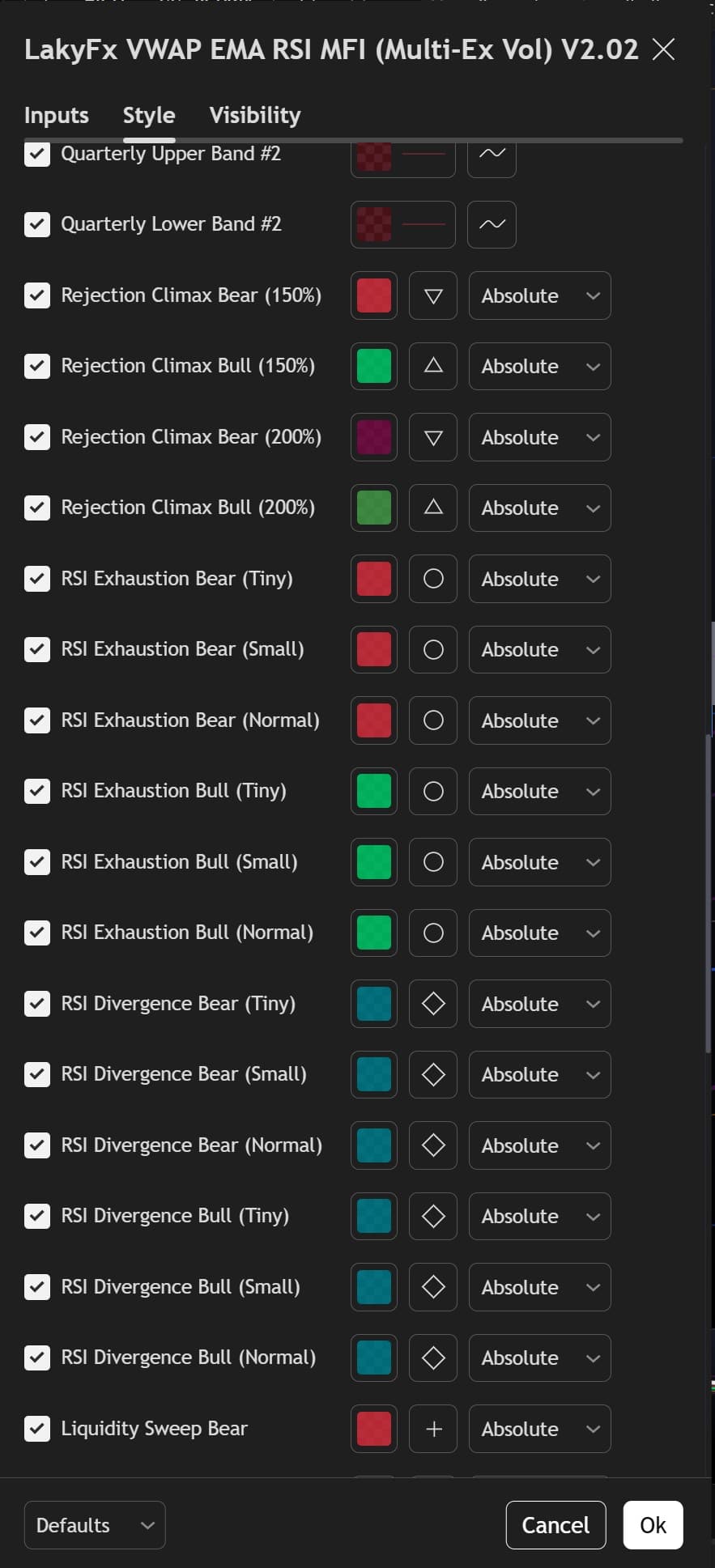
8. Style - Reversal Markers
Visual customization for all reversal markers. Configure colors, shapes (triangles, circles, diamonds, plus signs), sizes (Tiny, Small, Normal), and positioning for each marker type and volume threshold.
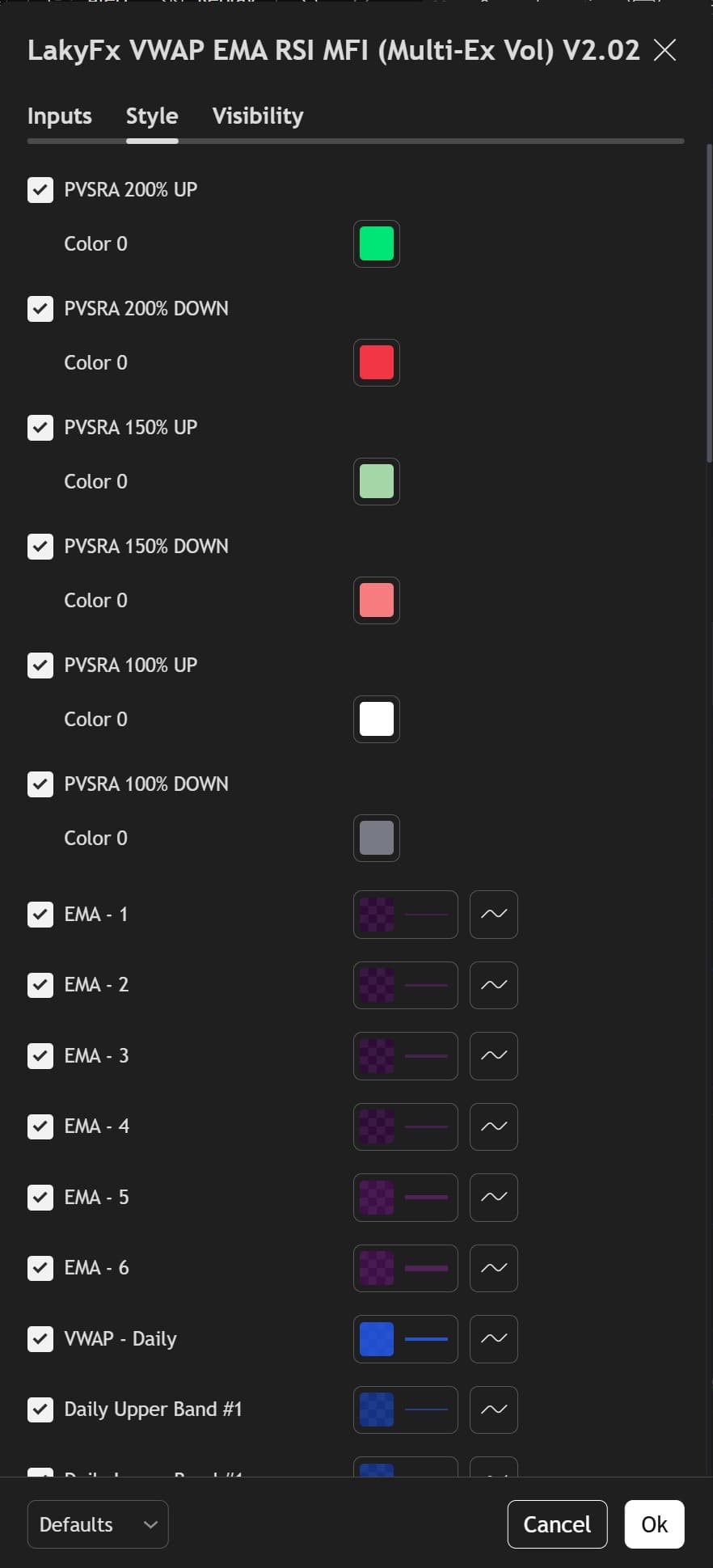
9. Style - PVSRA, EMA, VWAP
Complete visual styling: PVSRA candle colors (200%, 150%, 100% for up/down), all 6 EMA line colors and styles, and all VWAP bands (Daily, Weekly, Monthly, Quarterly) with independent colors and line styles.
🎯 100+ Settings - The Most Customizable Free Indicator on TradingView
No other free indicator offers this level of control. Every component can be fine-tuned: EMAs, VWAPs, reversal markers, volume sources, colors, sizes, filters, and more. Default settings work great, but advanced traders can customize everything to match their exact trading strategy.