LakyFx Delta Divergence Bands
Advanced delta indicator with multi-exchange aggregation, LTF delta analysis, regime bands, absorption signals, and comprehensive divergence detection.
📊 Get Indicator on TradingView→Table of Contents
Overview
What Makes This Indicator Unique?
🌐 10-Exchange Delta Aggregation
This is the only free indicator that aggregates delta (buy/sell pressure) from 10 major crypto exchanges simultaneously. While others show delta from a single exchange, this indicator gives you the true market-wide order flow picture. For stocks/indices, it seamlessly switches to single-source mode.
⚡ LTF Delta (Lower Timeframe) Analysis
Instead of calculating delta on the chart timeframe, the indicator can aggregate delta from 1-minute candles (or 15m/1H/1D depending on chart TF) and sum them into your current bar. This provides much more accurate delta readings, especially on higher timeframes.
📊 Regime Bands (Adaptive Extremes)
Uses Z-score analysis to create adaptive overbought/oversold zones. Unlike fixed levels, these bands adjust to current market volatility, making them more accurate for identifying extremes.
🎯 Absorption Signals
Detects absorption - when there's high delta effort (buying/selling pressure) but little price progress. This often indicates smart money accumulation/distribution. The indicator converts this into actionable BUY/SELL signals with confirmation triggers.
🔍 Comprehensive Divergence Detection
Detects both regular and hidden divergences between price and delta signals. Can use Raw Delta, MA2, or Cumulative Delta as the signal source. Highly configurable pivot detection and filtering.
💰 100% Free Forever
Professional-grade delta analysis tools that premium services charge $100+/month for - completely free. No subscriptions, no hidden costs.
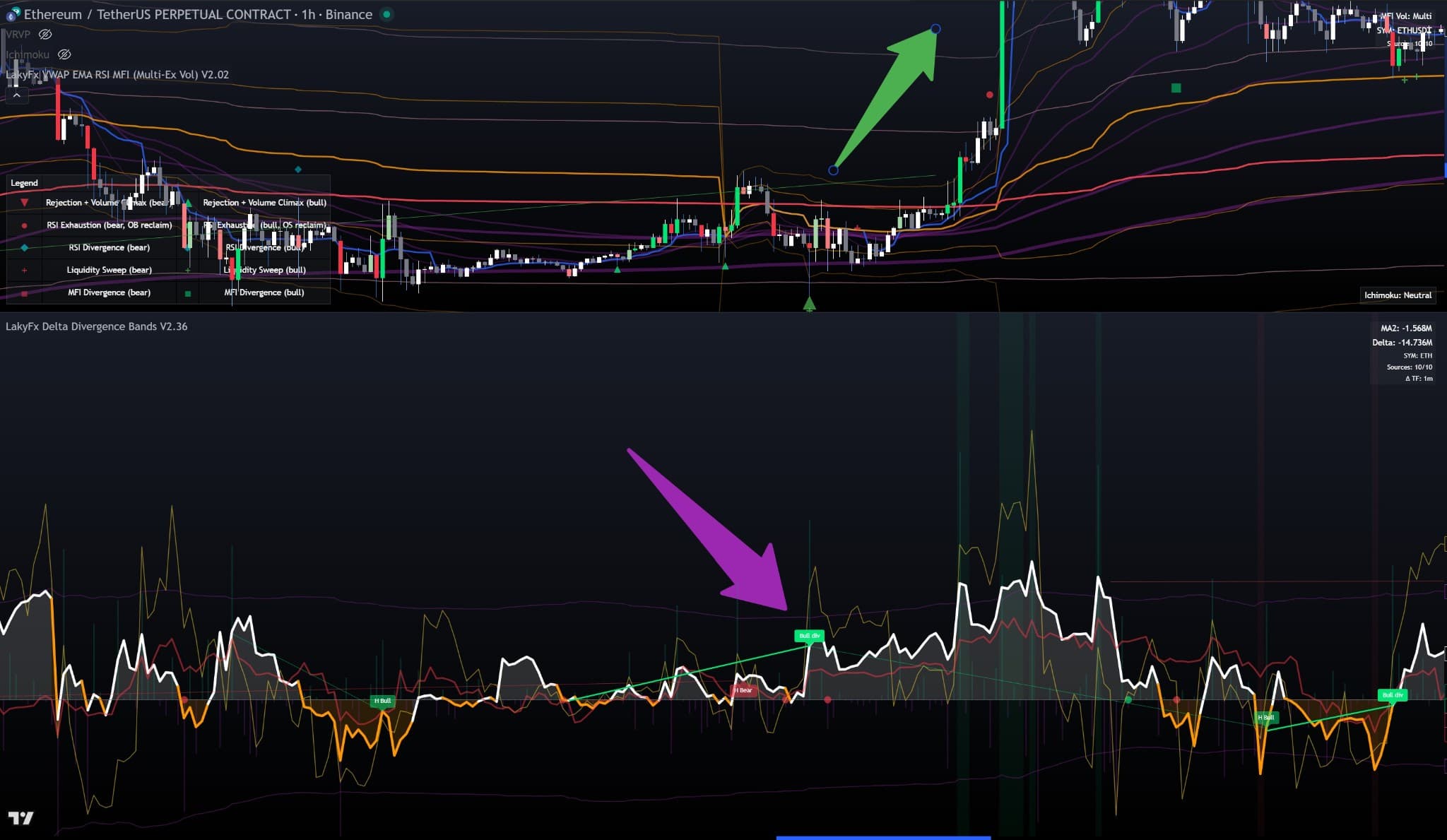
Full Indicator View: Complete Delta Divergence Bands indicator on ETH/USDT 1h chart. Shows delta histogram (white for positive, orange for negative), 3 MAs (red, white, yellow lines), regime bands (dynamic shading), absorption signals (H Bull labels in negative delta regions), and divergences (Bull div labels with green dashed lines). Purple arrow highlights a bullish divergence where delta shows strength while price consolidates, preceding an upward reversal. Top-right shows "Sources: 10/10" confirming multi-exchange aggregation.
Quick Start Guide
🚀 Get Trading in 2 Minutes
The indicator works perfectly with default settings. No configuration needed to start!
Step 1: Add to Chart
Visit the TradingView script page and click "Use on chart" to add the indicator directly to your chart. The indicator will automatically detect your chart's base currency and map to all 10 exchanges!
📊 Get Indicator on TradingView→Step 2: Understand the Basics
- Delta Histogram (Teal/Purple bars): Positive (teal) = buying pressure, Negative (purple) = selling pressure
- MA2 (White/Orange line): Main moving average - above 0 = bullish, below 0 = bearish
- Regime Bands: Adaptive extremes - when delta reaches these bands, market is overbought/oversold
- Absorption Signals (Circles): High effort, low result = potential reversal
- Divergences (Lines + Labels): Price and delta moving opposite = reversal signal
Step 3: Start Trading
Look for divergences at regime band extremes, absorption signals with MA2 confirmation, or delta crossing above/below zero with MA2 alignment.
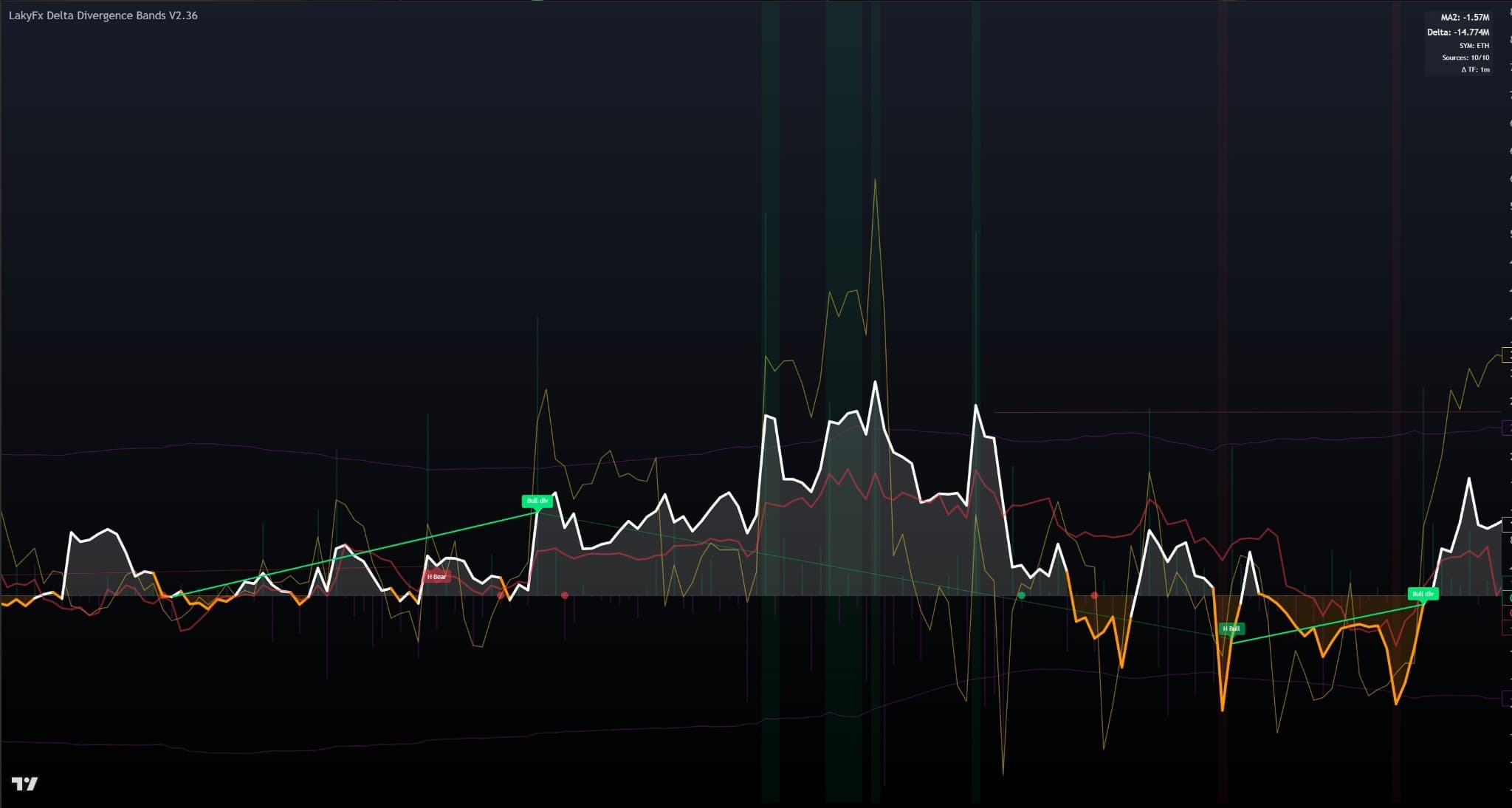
Quick Start Example: Default indicator setup showing core components clearly labeled. Delta histogram (green bars above zero line = positive delta, red bars below = negative delta), 3 MAs (white, red, yellow lines smoothing delta data), and basic divergence signals (Bull div = bullish divergence, H Bear = hidden bearish divergence). Top-right panel shows current values: MA2, Delta, Symbol (ETH), Sources (10/10), and Active Timeframe (1m).
Multi-Exchange Delta Aggregation
This is the most unique feature of the indicator - it aggregates delta from 10 major crypto exchanges, giving you the true market-wide order flow.
Supported Exchanges
How It Works
Auto Symbol Mapping: When enabled (default), the indicator automatically maps your chart's base currency to the correct symbol on each exchange. For example, viewing BTC automatically uses BINANCE:BTCUSDT, OKX:BTCUSDT.P, etc.
Delta Calculation: For each exchange, calculates delta (buy volume - sell volume) using either "Candle Anatomy" (body + wicks) or "Simple" (up = buy, down = sell) method.
Aggregation: Sums delta from all enabled exchanges. Default: simple sum. Optional: weighted by volume share (reduces impact of outlier venues).
Stocks/Indices Mode: For non-crypto assets, automatically uses single source (chart symbol or proxy).
Why Multi-Exchange Matters
- True Market Picture: See total market order flow, not just one exchange
- Reduced Manipulation: Single exchange can be manipulated, aggregated data is much harder to manipulate
- More Accurate: Better delta readings with larger sample size
- Better Signals: Divergences and absorption signals are more reliable
- No Setup Required: Auto-mapping works out of the box
Weighted Aggregation (Optional)
By default, delta is a simple sum across all enabled sources. You can enable weighted aggregationwhere each source is weighted by its rolling volume share. This helps reduce distortion from outlier venues or when only a subset of sources is active.
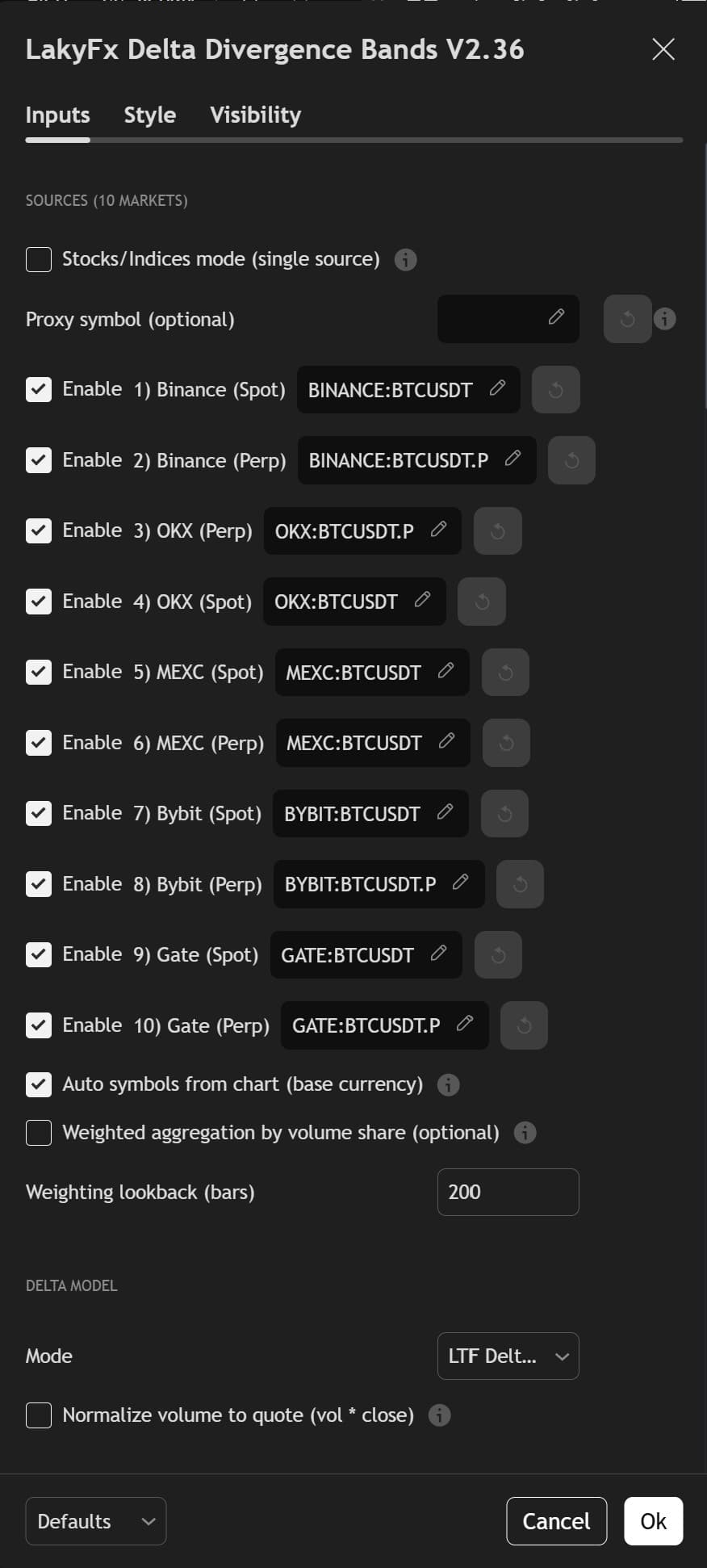
Settings Panel: "Sources (10 markets)" section with all 10 exchanges enabled. "Auto symbols from chart (base currency)" is checked, automatically mapping BTCUSDT symbols for all exchanges based on chart's base currency.
Value Box Display: Top-right corner shows "Sources: 10/10" confirming all 10 exchanges are active, and "SYM: BTCUSDT" demonstrating auto-mapping based on chart's base currency. This confirms successful multi-exchange delta aggregation.
Delta Analysis
Delta represents the imbalance between buying and selling pressure. Positive delta = more buying, Negative delta = more selling.
Delta Calculation Modes
Most accurate method. Splits volume based on candle structure:
- Body volume goes to the winning side (bullish = buy, bearish = sell)
- Lower wick volume = buying pressure (support)
- Upper wick volume = selling pressure (resistance)
- Formula: Buy Volume = (Body + Lower Wick) / Total Range × Volume
Simpler method: Green candle = all volume is buy, Red candle = all volume is sell. Less accurate but faster to calculate.
Calculates delta on 1-minute candles (or 15m/1H/1D based on chart TF) and sums them. Much more accurate on higher timeframes. Uses Candle Anatomy method.
Same as above but uses Simple method for LTF calculation.
LTF (Lower Timeframe) Delta - Why It Matters
When you're on a 4H or Daily chart, calculating delta on that timeframe gives you only 1 data point per bar. But if you calculate delta on 1-minute candles and sum them, you get much more accurate readings.
Example: On a 4H chart, one bar = 240 minutes. LTF mode calculates delta on each of those 240 minutes and sums them.
Dynamic Selection: Indicator automatically selects appropriate LTF based on chart timeframe:
- Chart ≤ 1H: Uses 1m LTF
- 1H < Chart ≤ 4H: Uses 15m LTF
- 4H < Chart < 1W: Uses 1H LTF
- Chart ≥ 1W: Uses 1D LTF
Delta Histogram
The histogram shows delta as colored bars:
- Teal bars: Positive delta (buying pressure)
- Purple bars: Negative delta (selling pressure)
- Bar height: Magnitude of delta (more buying/selling)
Visual Scaling: You can adjust histogram height and use scaling modes (Raw, Log, Normalize) to improve readability when delta spikes compress the panel.
Moving Averages (3x)
MA Types: Can use EMA, SMA, RMA, WMA, or VWMA. Each has different characteristics.
Coloring: MAs can be colored by "Above/Below 0" (white above, orange below) or "Slope" (white rising, orange falling).
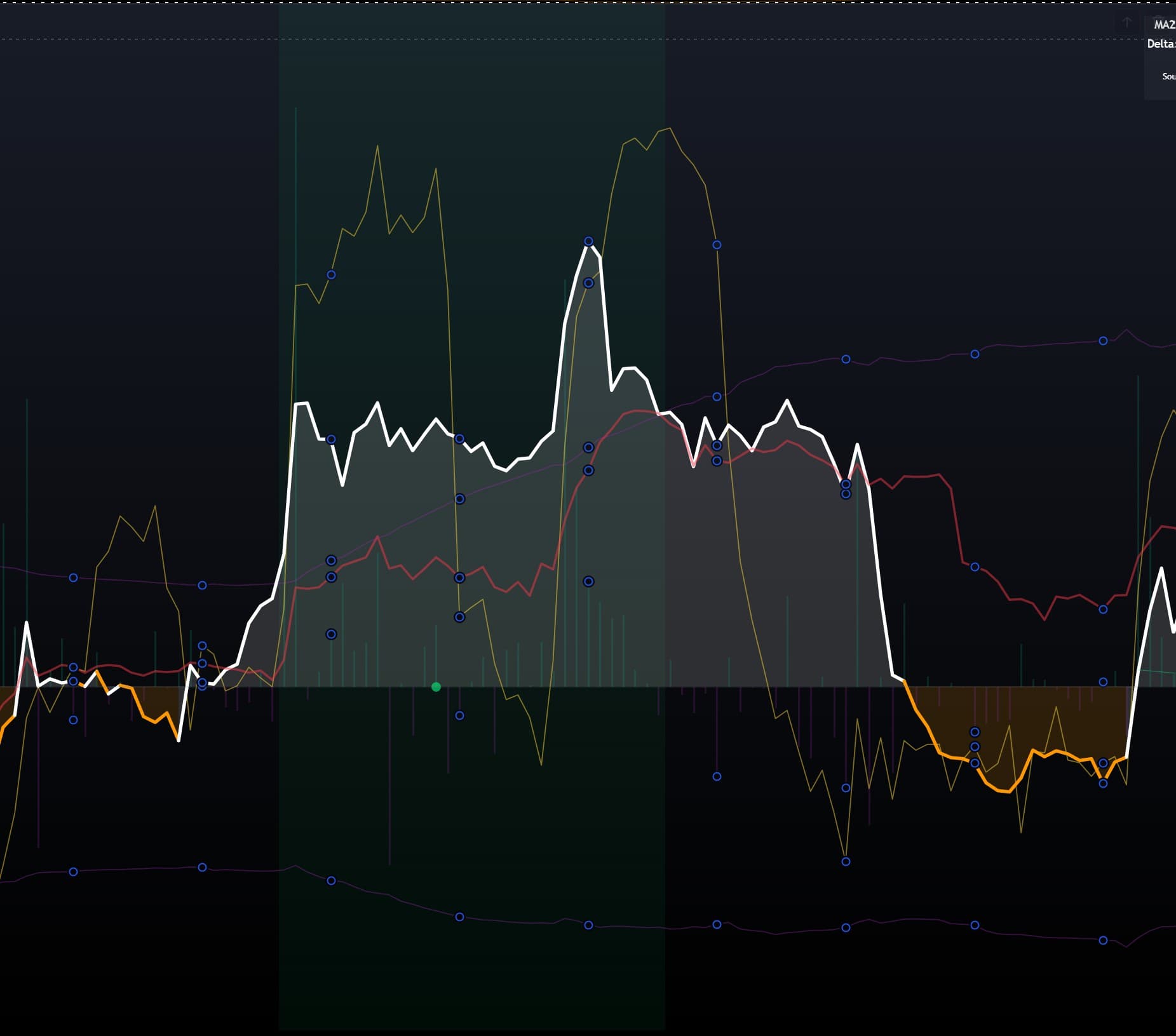
Delta Analysis Example: Indicator panel showing delta histogram (teal bars above zero line = positive delta/buying pressure, purple bars below = negative delta/selling pressure), 3 MAs (white = fast, yellow = medium, red = slow), and zero line (horizontal reference). Central section demonstrates strong positive delta (tall teal bars) leading to sharp upward movementof all MAs, correlating with price increase. Right section shows negative delta (purple bars) with MAs declining, indicating selling pressure and price decrease.
Regime Bands (Adaptive Extremes)
Unlike fixed overbought/oversold levels, Regime Bands use Z-score analysisto create adaptive extremes that adjust to current market volatility.
How Z-Score Works
Z-Score = (Value - Mean) / Standard Deviation
The indicator calculates Z-score of delta (or MA2, or Cumulative Delta) over a lookback period (default: 200 bars).
Regime Bands = Mean ± (Threshold × Standard Deviation)
When delta Z-score reaches ±Threshold (default: 2.1), the market is in an extreme regime.
Configuration
MA2 is default - smoother and less noisy
Higher = more stable bands, slower to react
Lower = more sensitive (more extreme readings), Higher = less sensitive
OFF uses 0 as center (less adaptive)
Visual Features
- Band Lines: Purple lines showing upper and lower extremes
- Background Fill: Optional colored background when extremes are reached
- Lime background: Bull extreme (Z ≤ -T)
- Red background: Bear extreme (Z ≥ +T)
- Transparency: Highly customizable (default: 95% transparent)
Trading Applications
- Extreme Readings: When delta reaches regime bands, market is overbought/oversold
- Reversal Signals: Combined with divergences or absorption, extreme readings are powerful reversal signals
- Filtering: Can filter divergences to only show at extremes (increases signal quality)
- Trend Exhaustion: Extreme readings often mark trend exhaustion
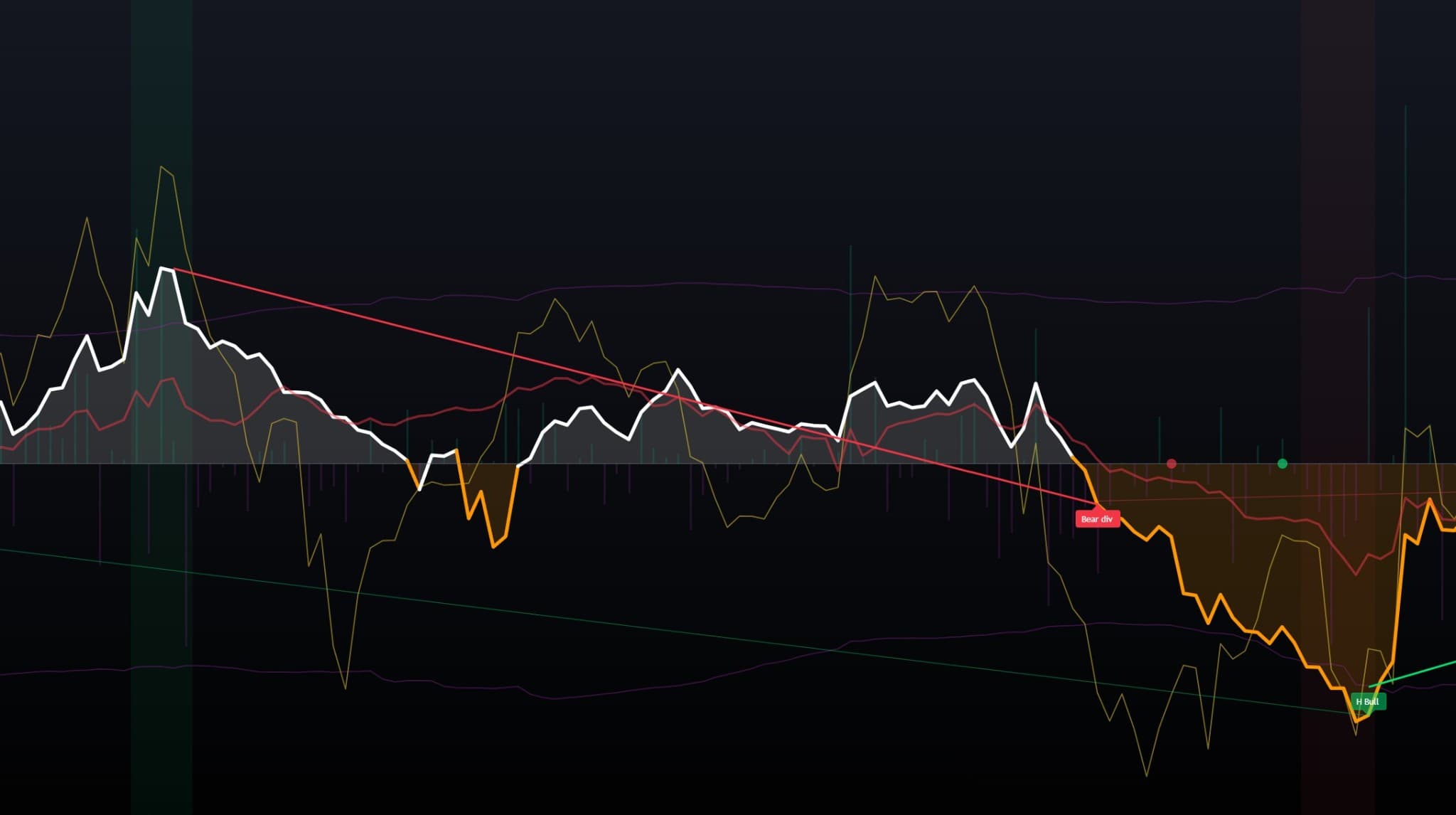
Regime Bands & Extreme Z-Scores: Indicator showing regime bands (two purple horizontal lines marking upper and lower extremes) with background fills when delta reaches extreme Z-scores: red/orange fill (right side) indicates extreme negative delta, lime green fill (far right) indicates extreme positive delta. These extremes correlate with price reversals: "Bear div" signal appears before red fill, and "H Bull" (hidden bullish) signal appears at the lime green extreme, marking potential reversal points.
Absorption Signals
Absorption occurs when there's high delta effort (strong buying or selling pressure) but little price progress. This often indicates smart money accumulation (buying) or distribution (selling) - they're absorbing all the selling/buying without moving price much.
How Absorption Detection Works
Effort vs Result Ratio: Calculates abs(delta) / price_movement
Result Metric: Can use True Range or Body (abs close-open)
Z-Score: Compares current ratio to historical average (default: 150 bars lookback)
Setup Threshold: When Z-score ≥ threshold (default: 2.0), absorption setup is detected
Signal Types
🔵 BUY Signal (Lime Circle)
Setup: Sell absorption (negative delta) with high Z-score
Trigger: Price breaks above the absorption candle's high (or close breaks high if using Close basis)
Confirmation: Optional MA2 slope confirmation (MA2 must be rising)
Window: Trigger must occur within N bars (default: 20) after setup
🔴 SELL Signal (Red Circle)
Setup: Buy absorption (positive delta) with high Z-score
Trigger: Price breaks below the absorption candle's low (or close breaks low)
Confirmation: Optional MA2 slope confirmation (MA2 must be falling)
Window: Trigger must occur within N bars after setup
Filters
Only shows BUY setups when delta Z-score ≤ -T, SELL when Z-score ≥ +T
Increases signal quality by focusing on extremes
BUY requires MA2 rising, SELL requires MA2 falling
Default: ON - reduces false signals
Configuration
Higher = fewer, stronger setups
Close: uses close price, Wicks: uses high/low
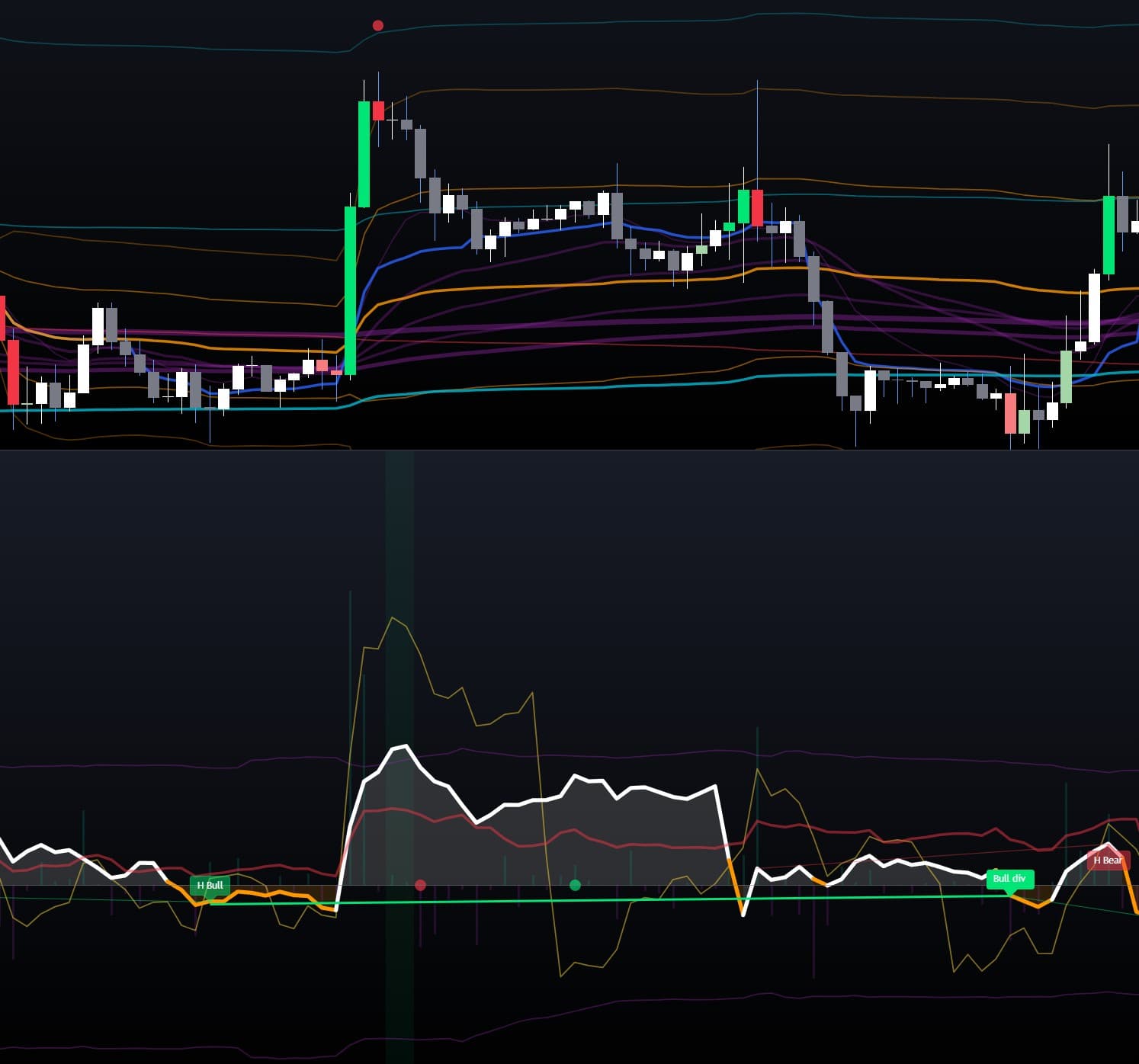
Absorption Setup - "Effort vs Result": Two-panel chart demonstrating absorption concept. Top panel: Price action with small candles during absorption period, followed by large green breakout candle. Bottom panel: Delta indicator showing high delta (large teal histogram bar and sharp white line spike) with little price movement (small candles in top panel) - this is the "effort" (buying pressure being absorbed). Green circle on zero line marks the absorption signal/breakout trigger, followed by strong price breakout (large green candle) - this is the "result". Demonstrates how smart money accumulates during high delta with minimal price movement, then triggers explosive moves.
Divergence Detection
Divergences occur when price and delta move in opposite directions. This is one of the most reliable reversal signals in trading.
Regular Bullish Divergence
Price: Makes lower low
Delta Signal: Makes higher low
Meaning: Selling pressure is decreasing even though price is falling - bullish reversal likely
Visual: Green line connecting the two delta pivot lows, "Bull div" label
Source: Can use Raw Delta, MA2 (default), or Cumulative Delta
Regular Bearish Divergence
Price: Makes higher high
Delta Signal: Makes lower high
Meaning: Buying pressure is decreasing even though price is rising - bearish reversal likely
Visual: Red line connecting the two delta pivot highs, "Bear div" label
Hidden Bullish Divergence
Price: Makes higher low
Delta Signal: Makes lower low
Meaning: Continuation pattern - trend likely to continue up
Visual: More transparent lime line, "H Bull" label
Price Basis: Can use Wicks (high/low) or Close
Hidden Bearish Divergence
Price: Makes lower high
Delta Signal: Makes higher high
Meaning: Continuation pattern - trend likely to continue down
Visual: More transparent red line, "H Bear" label
Configuration
MA2 is default - smoother, fewer false signals
Higher = fewer, cleaner pivots. Lower = more signals (more noise)
Period for cumulative sum calculation
How many divergences to display on chart
Only show divergences when delta is at regime band extremes
Trading Applications
- Regular Divergences: Best reversal signals, especially at regime extremes
- Hidden Divergences: Continuation signals - trade in trend direction
- Confluence: Divergences at VWAP/EMA levels are more reliable
- Confirmation: Wait for price confirmation before entering (divergence doesn't guarantee immediate reversal)
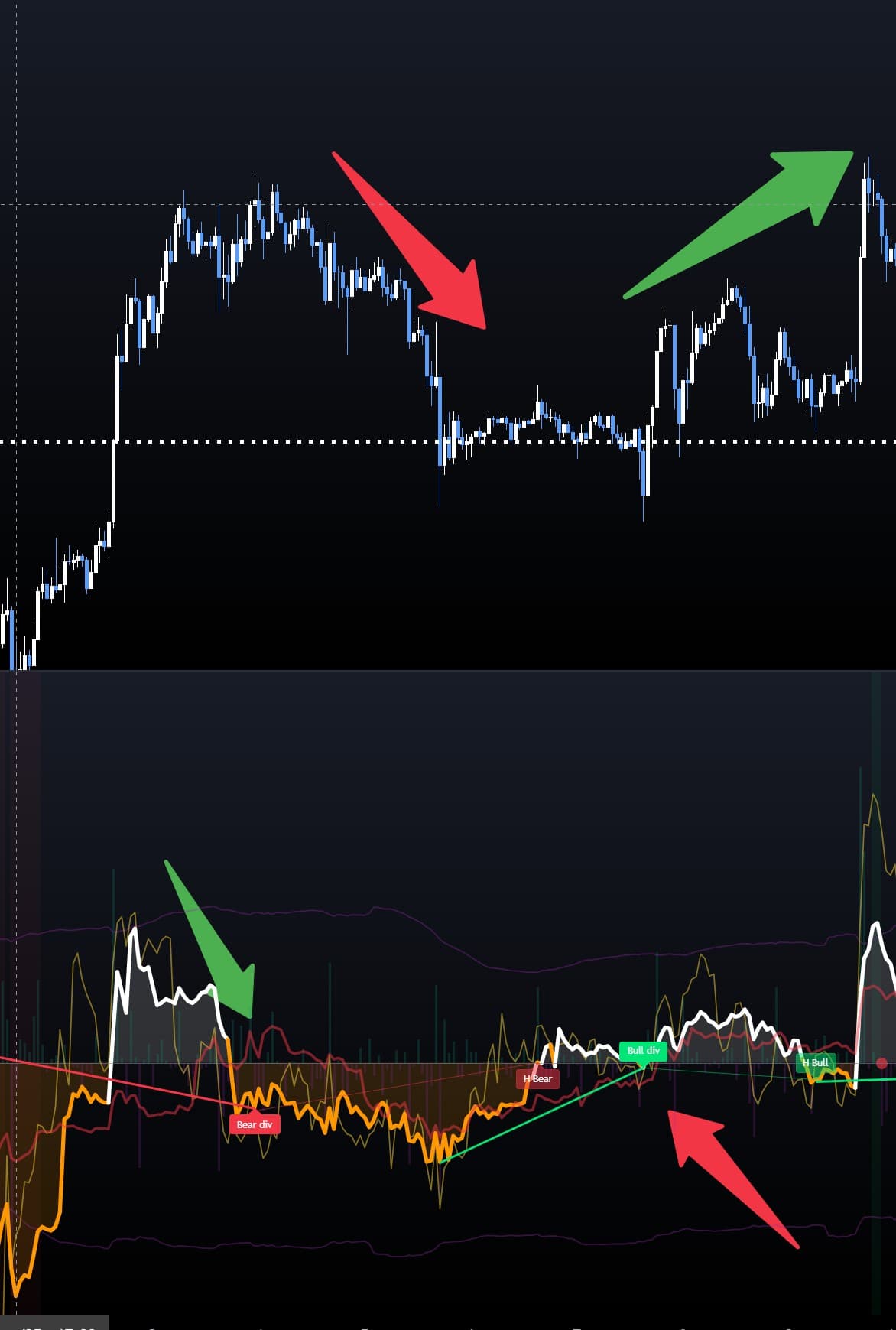
Bullish Divergence Example: Two-panel chart demonstrating clear bullish divergence. Top panel: Price action showing lower low (red arrow indicates downtrend). Bottom panel: Delta indicator showing MA2 (white line) making higher low - green upward-sloping line connects the two swing lows, with "Bull div" label. This divergence (price weaker, delta stronger) signals potential reversal. Large green arrow highlights the successful upward reversal that follows, validating the divergence signal. Also shows "Bear div" (left) and "H Bear"/"H Bull" labels for context.
Complete Settings Guide
The indicator has extensive customization options. This guide explains each setting group and how changes affect the indicator's behavior.
Sources (10 markets) Settings
Switches to single-source mode for stocks/ETFs/indices. Uses proxy symbol if set, otherwise chart symbol.
Optional single-source ticker (e.g., AMEX:SPY for SPX, CME:ES1! for S&P futures)
Toggle each of 10 exchanges on/off
Automatically maps base currency to exchange symbols. Turn OFF for manual override.
Weight each source by its volume share. Helps reduce distortion from outlier venues.
Period for calculating volume share weights
Delta Model Settings
- Candle Anatomy: Most accurate, uses body + wicks
- Simple: Up=Buy, Down=Sell
- LTF Delta (1m) — Anatomy: LTF with Candle Anatomy (recommended)
- LTF Delta (1m) — Simple: LTF with Simple method
Useful when exchanges report volume in different units (contracts vs coins)
Readability / Scaling Settings
- Raw: Original delta values
- Log: Compress spikes with logarithm
- Normalize (Abs SMA): Divide by SMA(abs(delta), N) - recommended for readability
SMA period for normalization denominator
Higher = larger on-screen values (only in Normalize mode)
Visual Settings
Visual scaling - lower = shorter bars, MAs take more space
Only affects display/autoscale, not calculations. Higher = MAs fill more of pane
Displays MA2 (in millions) and Delta in top-right corner
Shows active symbol and source count in value box
Moving Average Settings (3x)
Each MA (1, 2, 3) has identical settings:
SMA is default - simple and reliable
Defaults: MA1=14, MA2=27, MA3=57
MA2 is widest (default: 3) as it's the main indicator
Above/Below: white above zero, orange below. Slope: white rising, orange falling
Visual fill from MA2 to zero line
Regime Bands Settings
Lookback for Z-score calculation
Uses SMA as mean. OFF uses 0 as center
Z-score threshold for extremes. Lower = more sensitive
Colored background when extremes are reached
Only show divergences at extremes
Absorption Signals Settings
Divergence Settings
- Enable: Master switch
- Signal: Raw Delta, MA2 (default), or Cumulative Delta
- Pivot length: (default: 10) - Higher = fewer, cleaner pivots
- CumDelta length: (default: 14) - If using Cumulative Delta
- Keep last N divergences: (default: 20)
- Enable: Master switch
- Price basis: Wicks (default) or Close
- Signal: Raw Delta, MA2 (default), or Cumulative Delta
- Pivot length: (default: 10)
- Keep last N: (default: 20)
Note: Hidden divergences are more transparent visually (less prominent)
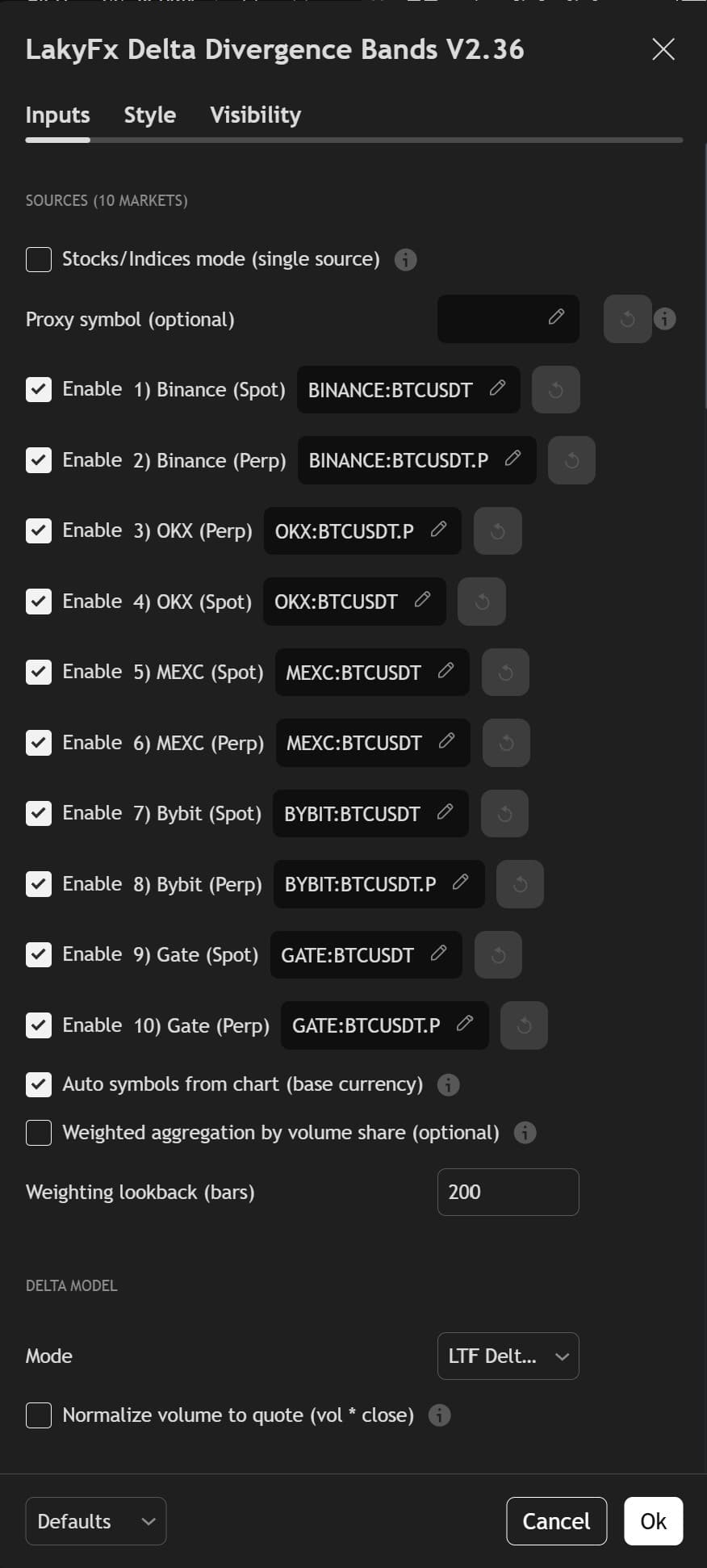
1. Sources (10 Markets) & Delta Model
Configure multi-exchange data sources (all 10 exchanges: Binance, OKX, MEXC, Bybit, Gate.io - Spot & Perp) with auto symbol mapping. Delta Model settings for LTF (Lower Timeframe) delta calculation and volume normalization.
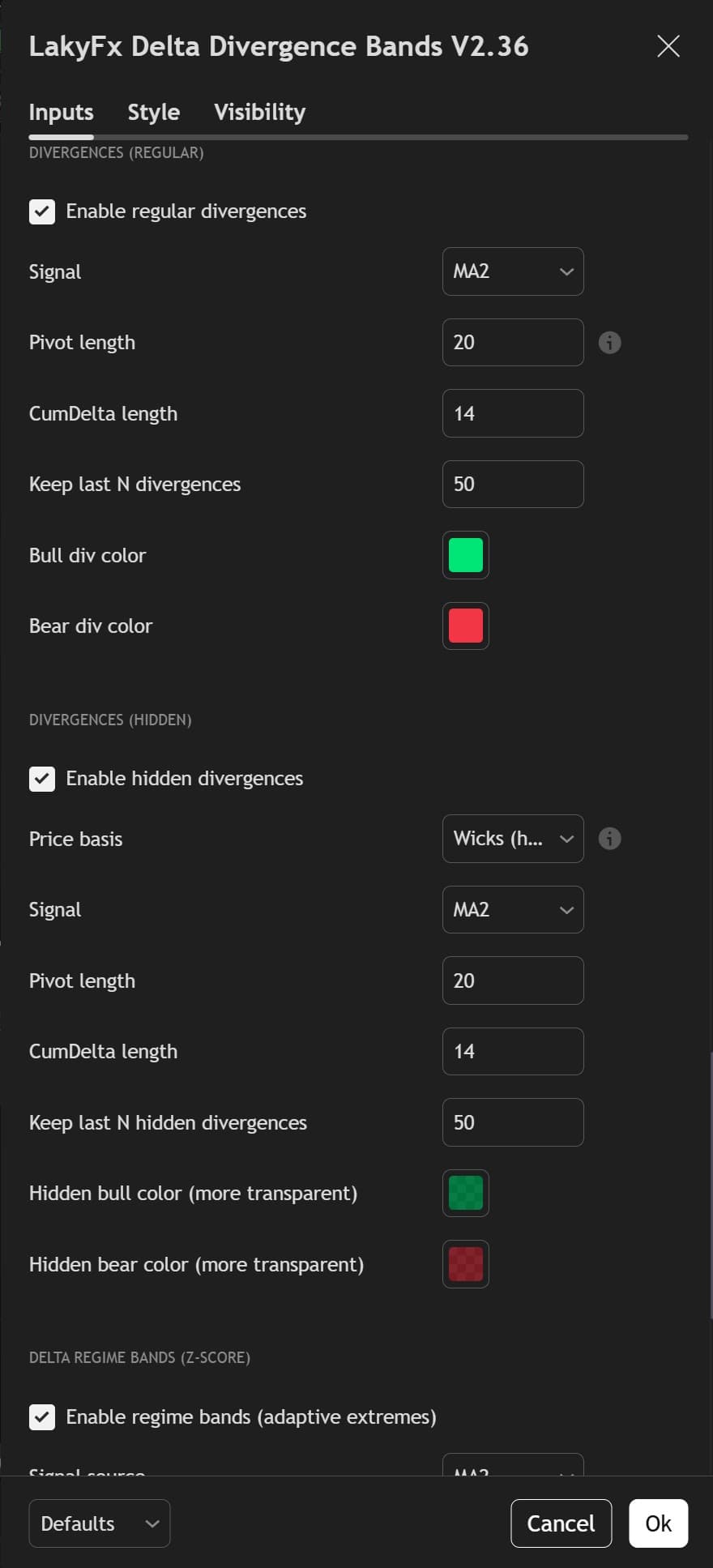
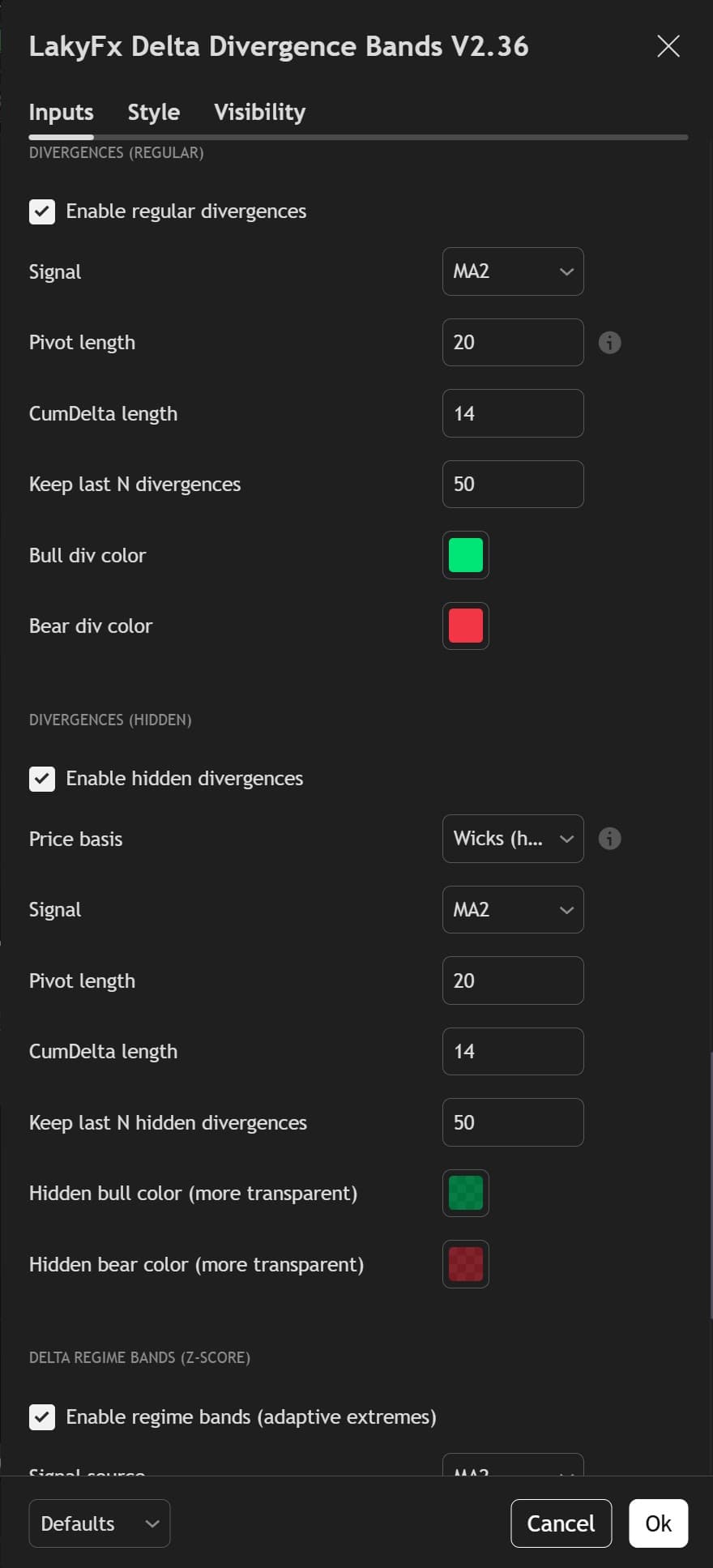
2. Divergences & Regime Bands
Configure Regular Divergences (signal, pivot length, CumDelta length, colors) and Hidden Divergences (price basis, signal, colors with transparency). Delta Regime Bands (Z-Score) settings for adaptive extremes with signal source configuration.